EN

For those navigating the complexities of Health and Medical Device Software, understanding and integrating IEC 81001-5-1 into your processes is crucial, especially in today's landscape where cybersecurity is increasingly essential.

Recent regulatory shifts, such as the EU Commission's decision on 27th of May, 2024 to delay many standards' harmonisation deadlines under EU MDR and IVDR, including IEC 81001-5-1 until 2028, highlight the need to grasp not just when but also why compliance with this standard is critical.

What is IEC 81001-5-1?

IEC 81001-5-1 is a cybersecurity process standard that outlines life cycle requirements covering the entire span of health software (including Medical Device Software (MDSW), Software in a Medical Device (SiMD), and Software as a Medical Device (SaMD)) from development through maintenance. Its primary aim is to enhance the cybersecurity of health software by integrating security measures at every stage of the software lifecycle, complementing safety-focused standards like IEC 62304. It was initially set to be recognized as a harmonized standard under the EU MDR and IVDR by 24th of May 2024.

The Current Regulatory and Advisory Landscape in the EU

While the EU's harmonization postponement introduces some uncertainty, influential voices within the industry have been recommending proactive compliance:

  • IGNB Recommendations: According to the Association of German Notified Bodies’ questionnaires from 2023, while compliance with IEC 81001-5-1 isn’t mandatory before it's harmonised, IGNB strongly recommends early adoption. This endorsement underscores the standard's relevance and the urgency of addressing cybersecurity risks sooner rather than later.
  • Team NB Position: Team NB, representing various European notified bodies, has endorsed IEC 81001-5-1 as a state-of-the-art standard since 2022, advocating for its adoption through transition plans as soon as possible. They emphasize the standard's role in establishing secure development life cycles, reflecting a broad consensus on its immediate utility and future necessity. [1]

International Compliance

Global markets such as the USA and Japan have already embraced IEC 81001-5-1, recognizing its critical role in ensuring product safety and market access:

  • In the USA, it has been a recognised consensus standard (like UL 2900-1 and 2900-2-1) since 2022 [4], and FDA’s latest cybersecurity guidance also recommends adapting this standard to use it as a framework for secure product development and maintenance.
  • In Japan, since 1st of April 2024, it is required that medical device manufacturers demonstrate conformity to the Essential Principles having updated cyber security requirements from 2023, including conformance to JIS T 81001-5-1 (IEC 81001-5-1). [5]

Why Comply Now?

  1. Cybersecurity as a Continuous Requirement: Cyber threats do not pause while regulations catch up. The proactive implementation of IEC 81001-5-1 helps mitigate these risks promptly.
  2. Regulatory Expectations and Market Needs: Even though the EU has extended harmonisation deadlines, and the current regulations do not require such an extensive security management that IEC 81001-5-1 provides, the market and regulatory bodies expect advanced cybersecurity measures.
  3. Filling Current Gaps: Many aspects that IEC 81001-5-1 covers, such as security relevant design inputs, secure design, security risk management including threat modelling and security testing (including but not limited to penetration testing), are already necessary under existing EU MDR, IVDR, and other regulations. Manufacturers implementing these measures independently may face inconsistencies and inefficiencies that adherence to a state-of-the-art standard like IEC 81001-5-1 can alleviate.

Implementation Advantages

Adopting IEC 81001-5-1 sooner rather than later provides several benefits:

  • Standardization of Security Practices: Instead of navigating varying interpretations of what constitutes adequate cybersecurity, companies can rely on a recognized standard that outlines clear, actionable tasks and processes.
  • Integration into Quality Management Systems (QMS): Aligning cybersecurity practices with QMS requirements becomes streamlined, ensuring that security measures are not just add-ons but are integrated throughout the product lifecycle.
  • Preparation for Future Regulatory Changes: With cybersecurity becoming a more prominent focus of medical device regulation globally, early compliance positions companies favourably for future shifts in the regulatory landscape.

Practical Integration into QMS

Much of the standard details activities and tasks that are logical (e.g., threat modelling, vulnerability testing, penetration testing) and may already be familiar to medical software developers, as these practices might already be implemented even without strict adherence to this standard. Common software development practices also include integrating security-related design inputs, following secure coding standards, and applying configuration management.IMG 0297

However, certain aspects of the standard could introduce new challenges or learning opportunities, even for seasoned security professionals. Specifically, the concept of classifying software items in relation to risk transfer and managing them effectively might be less familiar and necessitate thoughtful integration into current practices.

Implementing IEC 81001-5-1 into a QMS can be daunting, especially for startups with limited resources. To manage this effectively, companies, particularly those developing new devices, may consider adopting a staggered transition plan.

This strategy allows them to systematically embed cybersecurity measures into their processes without overextending their resources. Initially, they should focus on ensuring that cybersecurity measures are incorporated from the outset of software development. Subsequently, they can concentrate on the secure release of the software and the establishment of post-market management and monitoring practices. This structured approach guarantees that the software is secure-by-design, positioning cybersecurity as an integral and effective component rather than a superficial add-on.

Conclusion

The question of when to comply with IEC 81001-5-1 might be influenced by regulatory timelines, but the reasons to comply sooner are compelling. Beyond mere compliance, integrating IEC 81001-5-1 reflects a commitment to safety, security, and excellence in Health Software Lifecycle Management. As cyber threats evolve, the importance of robust cybersecurity measures will only increase, making timely adoption of standards like IEC 81001-5-1 not just a strategic advantage but a necessary safeguard.

About the Expert

quaregia Mainlogo transparentPeter Roka is a seasoned professional with over ten years in the medical device industry, specializing in medical device software and QMS development. With a robust background in electrical and biomedical engineering, along with extensive experience in developing and managing medical devices, as well as regulatory and quality consultancy, he brings a unique and comprehensive blend of R&D and QARA expertise to guide the entire product lifecycle.

Read more on www.quaregia.com

{fastsocialshare}

Creating a Design History File (DHF) for a medical device is an intricate and time-consuming process.

Those of you with experience know what I am talking about. The DHF, this comprehensive compilation of documents that detail the history of a medical device's design, development, and manufacturing, similar to the MDR/IVDR Technical File, requires a significant effort to write and, sometimes, an even larger effort to maintain.

On the surface, it’s a documentation exercise that swamp your best and brightest with seemingly menial tasks. However, it is also a non-optional activity required to ensure compliance with stringent regulatory requirements and, in essence, your ticket to the market.

I have yet to meet a medical device manufacturer that did not wish this process to go faster. So let’s take a look at the reasons why compiling a DHF takes such a long time and what can be done about it.

You might not know which documents to include

A Design History File consists of a large number of documents, often in the hundreds, each serving a specific purpose in detailing the device's development history. How do you know which documents to include?

Regulatory bodies like the FDA, through their Quality System Regulation (QSR) 820, prescribe the specific documents that constitute the required baseline.

However, compliance with the FDA's requirements is only part of the equation. You should also consider what your own quality management system requires as well as the requirements from the various medical device standards you, voluntarily or not, follow in your process.
GHTF

Known “Summary Technical Documentation” (STED) frameworks, such as those from the Global Harmonization Task Force (GHTF) Study Group 1 (SG1), serves as a table of content like structure for your DHF and provide additional guidance and I would recommend that you either follow a provided STED or develop your own.
Design History File Documents are Interdependent

One thing that makes the DHF particularly difficult to manage is the interdependence between the documents. Each document contains information that depends on information in other documents.

This interdependency means that changes in one document often necessitate updates in several others. If you update a design requirement, you may need to revise verification plans, risk assessments, and possibly even user manuals.

Managing these updates manually can be a real nightmare. You might not even know which documents are dependent on, and therefore potentially become inconsistent due to the information changes you make.

Manual processes are prone to oversight and errors, which further prolongs the DHF compilation. Given the sheer volume of documents and references, it’s impossible to keep all the current content of DHF documents in your head at once and trust your knowledge of the documents to keep them consistent.

Software tools such as Application Lifecycle Management (ALM) systems (e.g. Aligned Elements) can aid by automating change impact assessments and ensuring that all dependent documents are updated accordingly. This significantly reduce the effort required for these activities.

No-one is responsible for DHF efficiency

Ensuring regulatory compliance is paramount in the medical device industry, often taking precedence over process efficiency. A designated compliance officer typically oversees the documentation to ensure it meets regulatory standards. However, this focus on compliance can sometimes overshadow opportunities to streamline the documentation process. A compliance officer success is measured by the level of compliance, not efficiency.

The fear of jeopardizing compliance often leads to inefficiencies being overlooked or outright ignored. Even though that it is obvious to everybody involved that documentation efficiency is a tremendous economic opportunity, a QM might prefer to have engineers spend on hours creating exhaustive documentation rather than risk an additional hour spent on explaining an optimal but leaner documentation approach to an auditor.

Compliance checks and validations, such as tedious reviews and the creation of exhaustive verification data might be motivated from a compliance perspective, but are resource-intensive. Not having a dedicated responsible person for compliance efficiency is a sure-fire way of assuring that this topic will never receive the necessary attention it needs. 

Finding and Fixing Errors Takes Time

Errors in DHF documentation are a natural effect of the large number of interdependent documents.  Examples include unsigned or unapproved documents, missing traces between design controls, unmitigated risks, and use of outdated or obsolete information.

Identifying and rectifying these errors is a meticulous and time-consuming task, especially when done manually through reviews and checklists. Manual error detection is prone to human error and can be exhaustive.

Utilizing ALM software such as Aligned Elements can help by automatically detecting discrepancies and performing impact assessments, which can significantly reduce the time required to find and fix errors.

Conclusion

Each medical device engineering team may have their own reasons for spending more time than necessary on Design History File Activities. I hope that these tips might shed some light on your particular situation, and that they might help you to make the changes necessary to accelerate your Design History File process.

Use software to collaborate in your medical device requirements management process
  • Icon: <i class="fa-solid fa-chart-line"></i>
  • The industry's most adaptable Requirement Management System

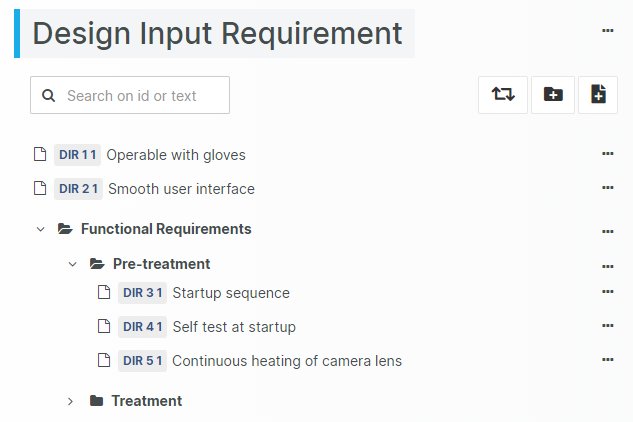
    User Needs, Design Inputs, and other Requirements are fundamental when setting up your MDR / IVDR / FDA QSR compliant Design History File / Technical File.

    Aligned Elements adapts to your unique QMS and Development Process, allowing you any number of Requirement, Specification and Design Input/Output types with uniquely customized input forms.

    Reporting and output styling is ready to match your company's corporate identity.

  • Control change. Complete audit trail.

    Change happens and that is expected.

    Rely on the strict automatic change control in Aligned Elements, ensuring that all changes are correctly tracked and timestamped without getting in the way of your work.

    A complete, chronological audit trail of all events is kept during the entire project life cycle, so you can demonstrate clear accountability and ensuring compliance with regulations such as ISO 13485, FDA QSR 820 and FDA QSR 21 CFR Part 11.

    A single, secure, and continuously updated repository for all your requirements will eliminate any confusion about the current state and location of your Design Input content.

  • Real-Time Team Collaboration

    Medical Device requirements management is a highly collaborative effort, requiring close interaction between users.

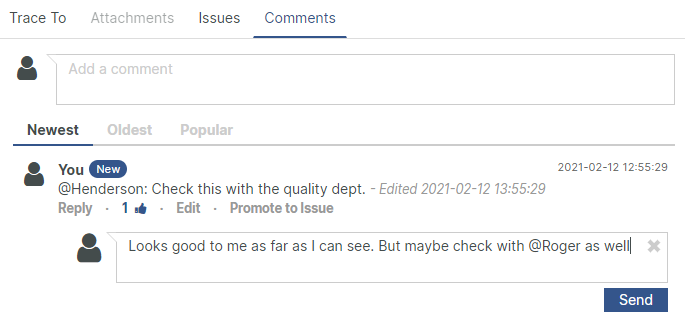
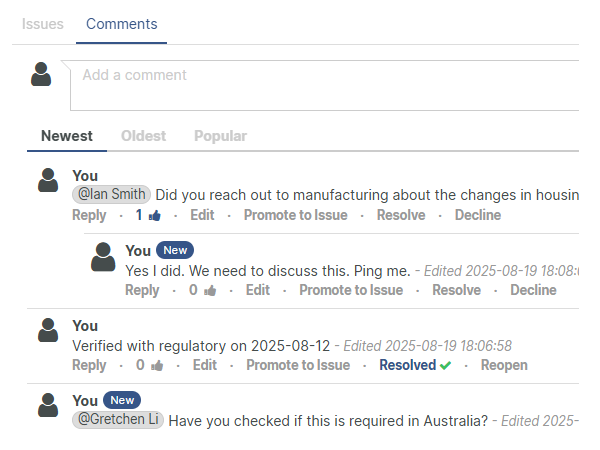
    In Aligned Elements, discussion and collaborate take place in real-time. Reviews, approvals, and sign-offs are communicated, assigned and coordinated efficiently, keeping your team up-to-date with automatic notifications and personal dashboards.

    Let each team-member customize their experience by highlighting favourite requirements for fast access or subscribing to updates of critical items to remain up-to-date with important changes.  

  • Reuse Requirements from many sources

    Reach new levels of efficiency by intelligent re-use of your own Requirements and our existing Regulatory libraries.

    • Extracting Requirements from legacy Word and Excel documents in your possession
    • Re-using your carefully elicited, reviewed and approved Requirements, using copying / imports
    • Connecting projects and re-use the same requirements in several contexts using referencing 
    • Leveraging our large set of preconfigured regulatory requirement libraries
    • Converting REQIF, XML or CSV files from external sources into native Aligned Elements Design Controls
[rocket]

Accelerate your journey to CE Mark and FDA approval

Try aligned elements 30 days for free!

Start Today

Discover world-class Design Control Management


Genuine Voices, Tangible Results

Continue reading

Reuse of medical device requirements for MDR and QSR
  • Icon: <i class="fa-solid fa-biohazard"></i>
  • How Risk drives Design - the benefits of integrated risk assessments

    Risk management is a central part of all medical device development and has an extensive and fundamental impact on how you design your device.

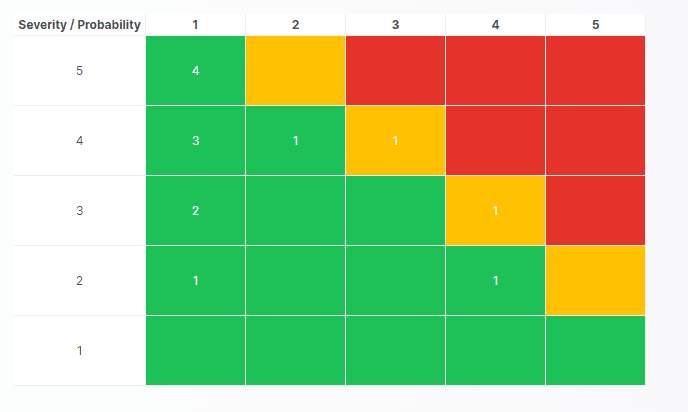
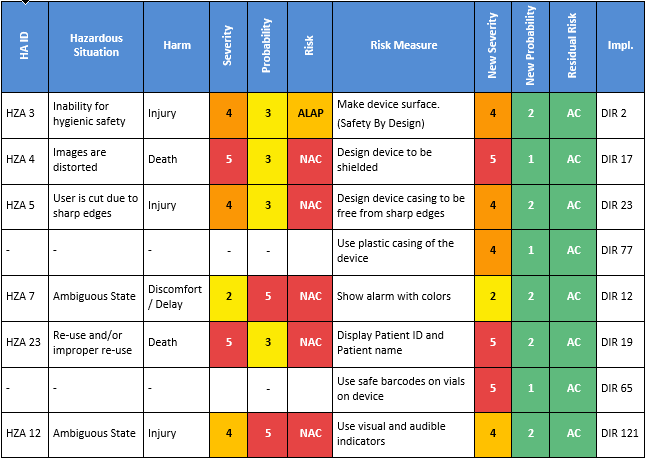
    Our tightly integrated ISO 14971 compliant risk assessments connect your design control items with risks, permitting risks, harms and risk control measures to affect and be affected by requirements, specification, verification and validation.

    Automation of menial tasks and continuous checking for risk acceptance errors is applied wherever possible during the risk management work.

  • How to identify all risks

    Risks appear in many shapes and forms, in different contexts and in different manifestation. Using a structured risk identification process is therefore paramount.

    Aligned Elements supports the use of several risk identification methods and several different types of risk assessments, including:

    • Top Down PHA Design Risk Assessments
    • FMEA Risk Assessments
    • Usability Risk Assessments
    • Manufacturing Process Risk Assessments
    • Cyber Security Risk Assessments

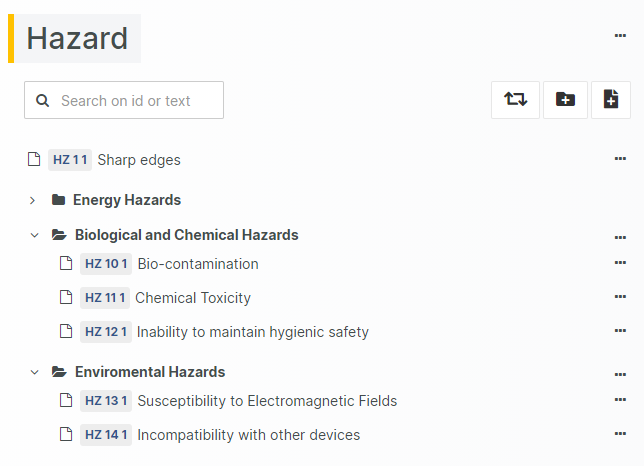
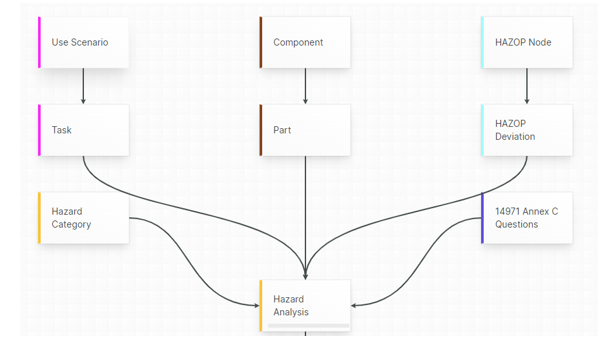
    Use our predefined Hazard Category Lists and our importable questions from ISO 14971 Annexes, derive Use Errors from Use Scenarios, or generate Hazard Analysis items directly from Design Input and Design Output.

  • Unparalleled configuration possibilities to match your unique Risk Assessment methods

    Apply our highly configurable Preliminary Hazard Analysis and FMEA components. Parameter naming, ranges, risk calculations, and thresholds are configured according to your needs.

    Automatic checks ensure that all risks are mitigated and that all risk control measures are implemented and verified.

    Connect the risk evaluations to your IEC 62304 Software Items, Software Units, and SOUPs to drive their Software Safety Classification.

    Correct classification throughout the architecture is ensured by quality checks.

  • Unique Risk reporting capabilities

    Each MS Words risk report type is completely customized to each customer's needs and uses the look-and-feel to fit each customers' Quality Management System, including layout, design, fonts, and colors.

    The risk reports can include any upstream and downstream levels to depict the full story, from Risk Identification to the verification results of implemented Risk Control Measures.

    The additional Risk Summary provides an overview of all Hazards before and after applying mitigations.

    The report can be exported both to Word and Excel.

[rocket]

Accelerate your journey to CE Mark and FDA approval

Try aligned elements 30 days for free!

Start Today


Genuine Voices, Tangible Results

Discover world-class Design Control Management

Continue reading

  • Icon: <i class="fa-solid fa-clipboard-check"></i>
  • Integrated V&V Process for compliant device development

    Verification and Validation are the most labour intense, and potentially most time-critical steps in medical device development.

    It is all the more important to use the most adequate tools and techniques to reduce overall effort, maximize re-use, avoid delays and gain full visibility into the process.

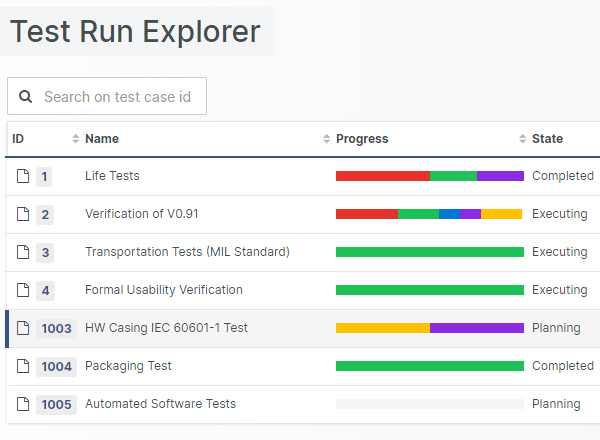
    Design, plan and execute test runs, track your team’s progress and capture results in one place so you always know where things stand.

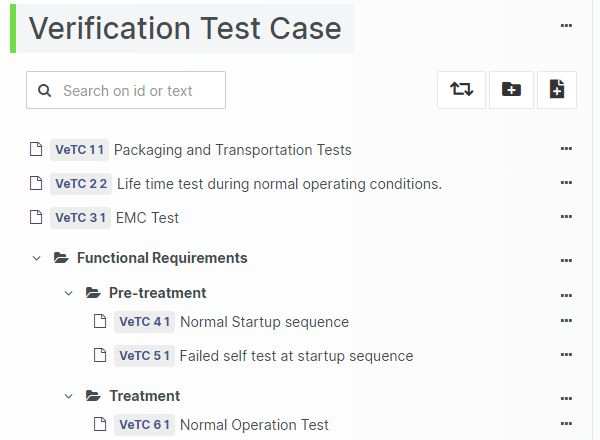
    Use ready-made test case templates to save time or define your own to fit the way you work. Aligned Elements supports your QMS and adapts to your preferred workflows.

    By managing Verification and Validation in Aligned Elements, you work more efficiently, make fewer errors, and stay confident in the quality of your documentation.

  • AI powered / Human driven Test Authoring

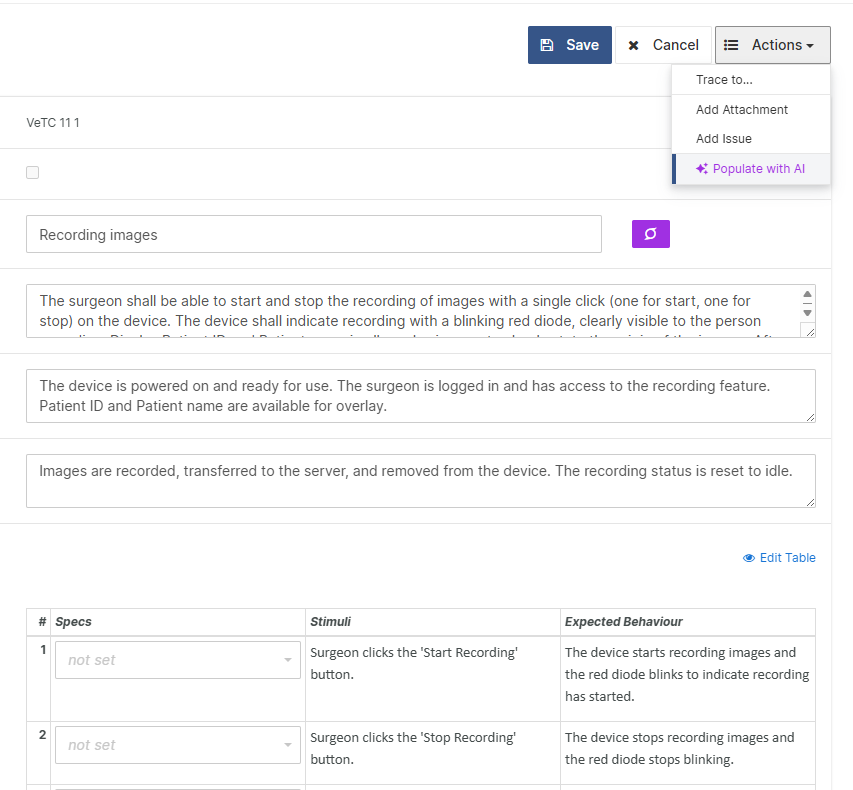
    Generate Test Cases from Requirements and Specifications, author the test step details, or allow our AI draft the Test Case steps for you.  

    As a Test Leader, plan your Test Runs ahead and balance the test effort among their team members and analyze the progress in real-time with build it burn-down charts.

    Record objective evidence using a rich set of data collection possibilities to align with Medical Device regulations such as FDA QSR 820 and IEC 62304.

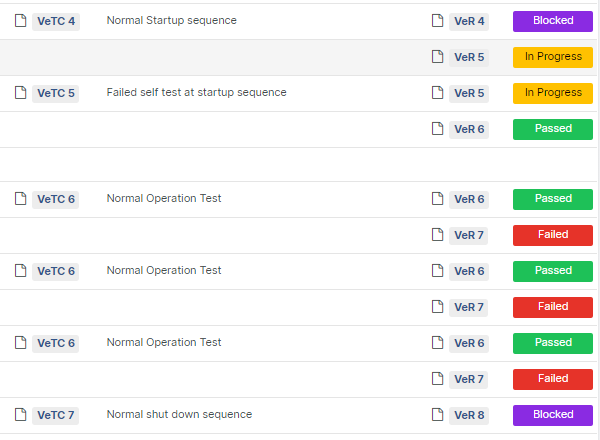
    Automatically detect incomplete, failed, and unexecuted tests, changes to test cases since last execution, overdue tasks using the built-in inconsistency checks.

  • Identify execution-bottlenecks early

    Testing often involves multiple team members working in parallel, and delays can appear before you see them coming.

    With Aligned Elements, you get real time visibility into who is testing what, what has been completed and what is falling behind.

    • Enable efficient, concurrent testing while keeping everyone aligned in one system

    • Quickly spot resource bottlenecks with built-progress charts

    • Catch issues before they grow using automated checks that flag missing traces, incomplete tests, overdue reviews and more

    By monitoring progress as it happens, you can reallocate resources in time and keep your Verification and Validation efforts moving forward, without last minute surprises.

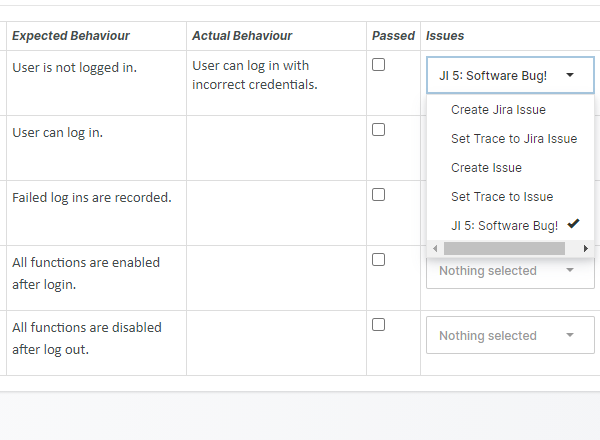
  • Use your own Defect Tracking system

    If you already have a Defect Tracking system in place, connect it to Aligned Elements to create new Defect tickets directly from your Test Execution view.

    Aligned Elements integrates with a range of systems such as Jira, Azure DevOps, Redmine and GitHub.

    Should you prefer to use Aligned Elements own a Defect Tracking system, you are all set. Our Issue System permits the creation, editing, and tracing of defects, applying the same strict version control as applied to other artefacts.

  • Include Automated Software Tests in Aligned's Traceability

    For good reasons, an increasing number of medical device manufacturers rely on automated software tests in their verification process.

    Automating tests is an efficient way to conserve human resources and gives you a possibility to re-direct your highly valuable, well-trained, verification personnel to challenge the device in unexpected ways, probe edge cases and concentrate of the probable and improbable scenarios of how human use of the device.  

    Leverage your automated software test results in the Aligned traceability by incorporating them as Design Control. This adds additional proof of verification depth and coverage and ultimately improves the quality of your device as well as the comprehensiveness of your Technical Documentation.

[rocket]

Accelerate your journey to CE Mark and FDA approval

Try aligned elements 30 days for free!

Start Today

Discover world-class Design Control Management


Genuine Voices, Tangible Results

Continue reading

  • Icon: <i class="fa-solid fa-chart-bar"></i>
  • Traceability - driving your Design forward

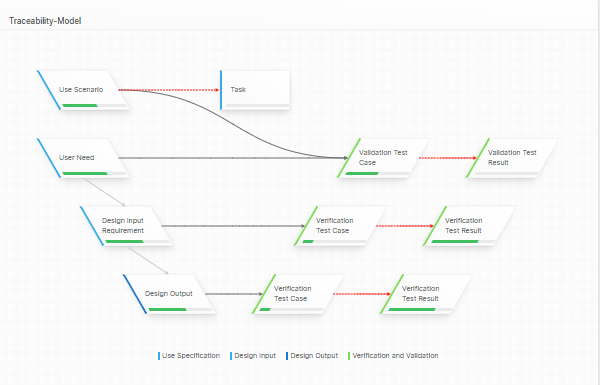
    The most valuable, strategic early-phase action you can do is to define the traceability structure of your Design Controls.

    This structure is used to drive your development forward, detect gaps and ultimately provide you with a complete, consistent, and correct Technical File.

    Let Aligned Elements create traceability matrices tailored to standards like IEC 62304, IEC 62366 and ISO 14971, as well as your own quality system and development SOP's.

    Keep your traceability complete and consistent while staying focused on the design itself. 

  • Live traceability - at your fingertips

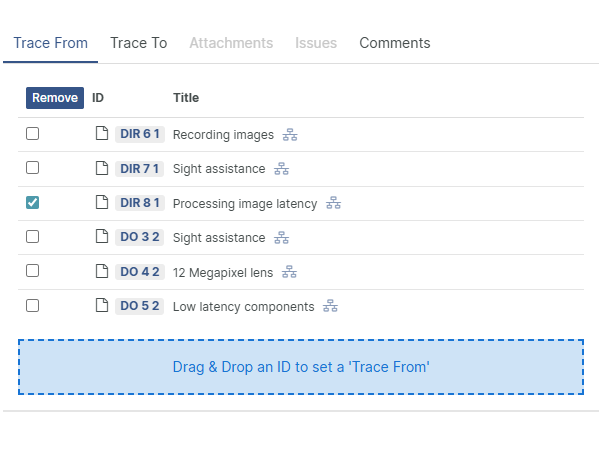
    Settings traces should be easy. Wherever you are in the project, trace actions are right there with no switching views, no extra steps.

    Whether you are dragging and dropping between items, selecting from smart search lists, or creating and tracing in one step, it is all designed to be fast and frictionless.

    You can resolve errors and set traces in the same move, apply batch changes across large sets, and manage traces seamlessly across multiple projects.

    Making traceability this easy means fewer disruptions, fewer missed links, and a lot more confidence in your data.

  • Discover AI-Driven Trace Candidates

    Large medical device project can involve thousands of traces. The sheer scale increases the risk of unintentionally missing relevant trace connections.

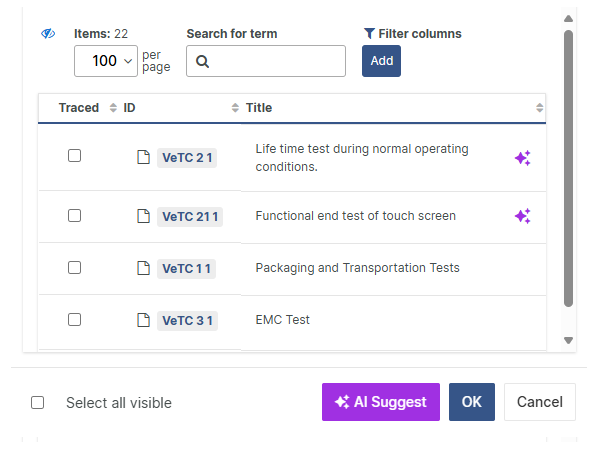
    With AI-powered assistance, you can explore, compare, and contrast trace candidates from our AI with your own selection. 

    You remain fully in control and always take the final decision. However, you now have support from a second set of eyes trained to uncover overseen candidates among the hundreds of available traces.

    Whether you are starting from scratch or reviewing existing traceability, our AI gives you the ability to compare your work with intelligent suggestions, based on context analysis, in real time. 

  • Traces Errors - Detected and solved within seconds

    Eliminate traceability errors with our built-in impact analysis of trace changes, provided to understand the impact of the change in the current project context.

    Run continuous real-time consistency checks to detect traceability gaps and perform Trace Analysis at any time to detect missing, illegal, suspect, and obsolete traces.

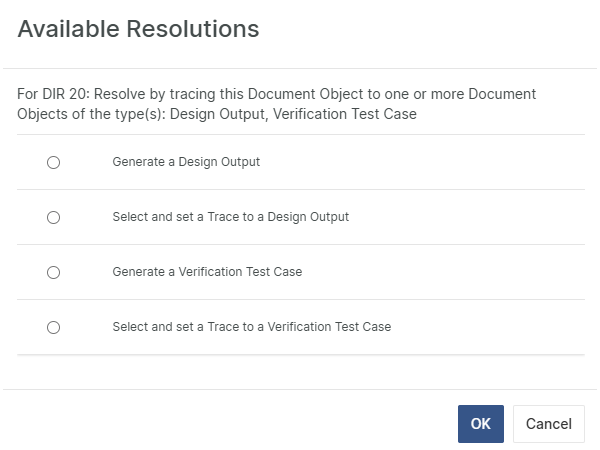
    Solve trace problems by selecting among Aligned Elements' suggested solutions with a single click. Detecting traceability problems and taking action to solve them has never been easier. 

  • Fast and flexible Traceability Matrix generation

    Build your own customized trace tables and matrixes on-the-fly, in the built-in Trace Table Designer.

    Generating a populated end-to-end trace table, based on your own Trace Table Design, is completed within seconds.

    Inspect the results, make modifications to the table design if necessary, or go straight to publish the relevant documents.

    Export the traceability matrix to Word or Excel or insert it directly in your Technical File Documents, using our unique Word Add-In.

    A single click is all it takes to update your documents containing traceability matrices, populating them with the latest traceability information. 

[rocket]

Accelerate your journey to CE Mark and FDA approval

Try aligned elements 30 days for free!

Start Today


Genuine Voices, Tangible Results

Discover world-class Design Control Management

Continue reading

  • Icon: <i class="fa-solid fa-calendar-days"></i>
  • Turn Design Controls into Complete, Compliant Documents

    When it is time to compile your Technical File, with us, the document creation will be a swift affair. With all Design Controls already in place, you can quickly insert them into your released and ready document templates with a single operation.

    Our built-in Document Management system ensures that each document is easily located and only accessible to those with appropriate permissions. 

    • Consistent revision mechanisms ensure full accountability of every document change

    • Complete history of all previous document revisions ensures full traceability for audits and regulatory inspections

    • Intelligent consistency checks warn you if the document contains outdated Design Controls, with a one-click synch option 

    You focus on building safe, effective devices. Aligned Elements is there to assist you with the documentation details.

  • Accelerate Document Approvals with Electronic Signatures

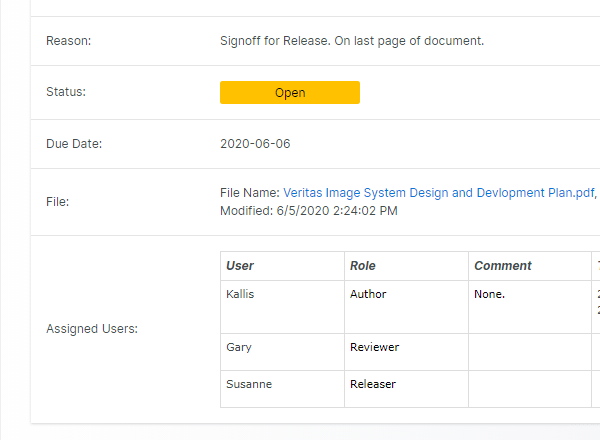
    With Aligned Elements, routing documents and sending out sign tasks happens automatically.

    • Speed up approvals by assigning signature responsibilities to roles, allowing the first available person to sign - no more waiting on specific individuals, using sequential or parallel sign-off workflows

    • Never miss a step with automatic email notifications and personalized dashboards that keep you instantly informed when it is your turn to sign.

    • Ensure FDA 21 CFR Part 11 and Annex 11 compliance with FDA-recommended x.509 V3 Class I certified digital signatures that provide legally binding, tamper-proof approvals.

    Released documents are displayed in a dedicated view to clearly separate them from documents in draft or review mode.

    This means your team can finalize DHF documents electronically, streamlining your Technical File effort, all within Aligned Elements.

  • Direct Integration with MS Word turns your Design Control to Technical File Documents

    MS Word: Use a software you already know to create your Technical File documents. Ensure that the document style matches your corporate identity.

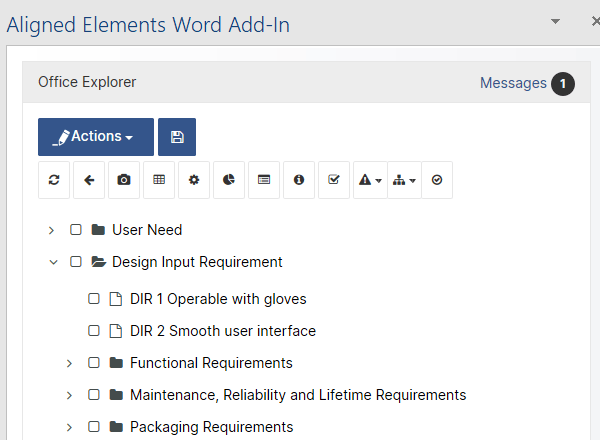
    Aligned Elements supports the controlled creation of Technical File / DHF documents using a direct insertion of design control elements into documents using our unique Word Add-In.

    Automatically generate traceability matrices, risk summaries, checklists, and DHF indexes. All Design Controls, requirements, specifications, risks, and tests and more, can be placed into any number of documents. 

  • One-click synchronization between document and database

    The Aligned Elements Word integration supports one-click bi-directional synchronization between document and database.

    The documents are updated with changes from the database. The database is updated with changes in the documents.

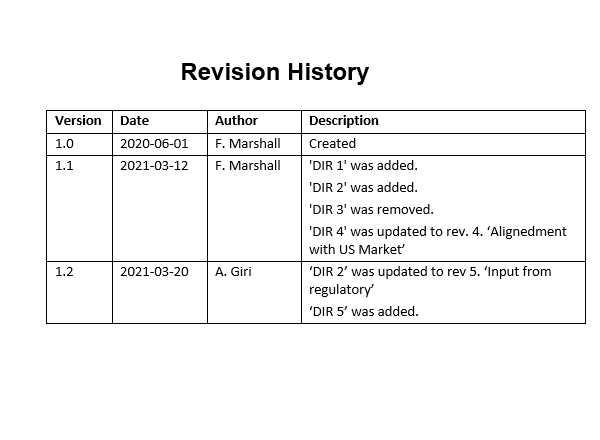
    Automatic detection of an out-of-sync state between document and database is highlighted to the user. Synching the document will automatically update the document's version history. 

  • Branded Documents tailored to your unique Corporate Identity

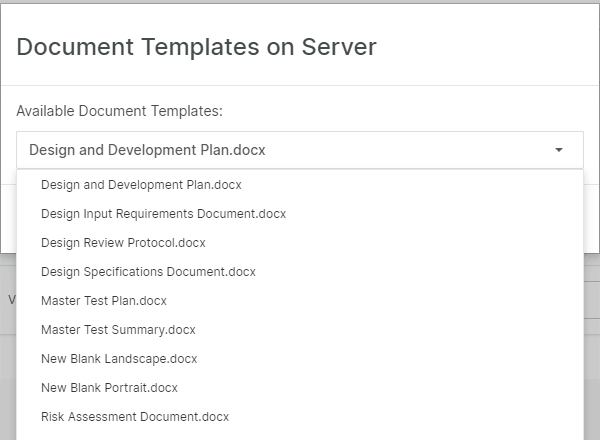
    Since your Quality Management probably already contains tried, tested and approved document templates, why not use them in Aligned Elements?

    The Word documents generated by Aligned Elements use the styling and look-and-feel from your existing document templates and permits DHF content from the database to be mixed with free text and images, getting the best out of Word.

    Furthermore, Aligned Elements supports different word styles for different contexts e.g. a formal style for official documents vis à vis an informal style for internal reviews.

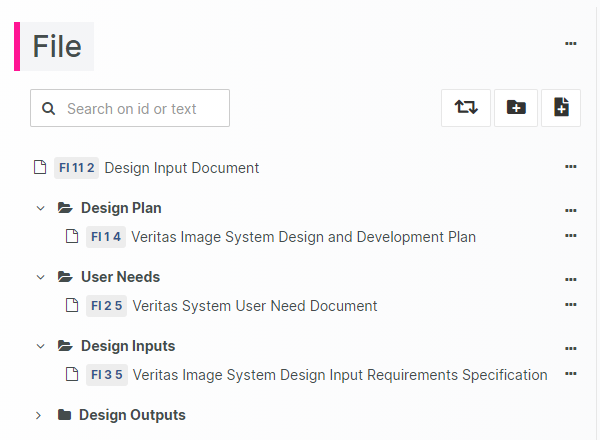
  • Simplified Design History File Management with an Integrated DHF Index / STED

    Managing the multitude of documents that form your Design History File (DHF) is easier and more reliable when you track them using a dedicated STED / DHF Index.

    This is where you specify the required documents in your Technical File, what templates to use, and who shall sign off on each document.

    Aligned Elements offers a built-in DHF Index that automatically keeps track of every document’s status, updating in real time as changes occur.

    Plus, powerful consistency checks give you clear, visual insights into the current completeness and health of your DHF, helping you identify gaps and stay on top of your documentation effortlessly.

[rocket]

Accelerate your journey to CE Mark and FDA approval

Try aligned elements 30 days for free!

Start Today


Genuine Voices, Tangible Results

Discover world-class Design Control Management

Continue reading

  • Icon: <i class="fa-solid fa-chart-line"></i>
  • Real-time error detection

    When submitting your Technical File, the last thing you want is doubt. Gaps, inconsistencies, and missing things in your Design Control Documentation can lead to delayed market access and lost revenues.

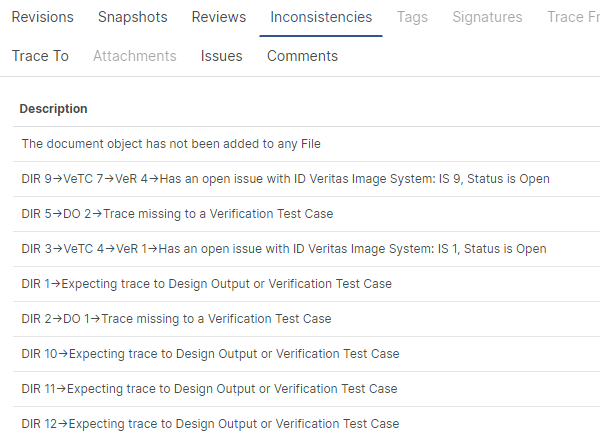
    Uncover and eliminate inconsistencies such as:

    • Missing, suspect, and illegal traces
    • Insufficiently mitigated risks
    • Unexecuted and failed tests
    • Incomplete and inconsistent Documents

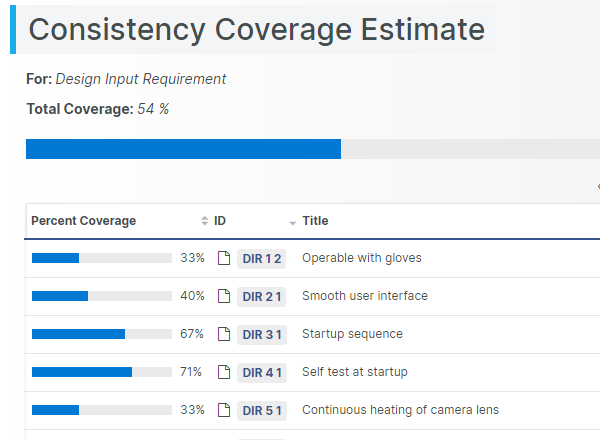
    Our visual consistency coverage shows you exactly where you stand and how far you have to go. No more guesswork. 20+ inconsistency rules available to provide complete transparency.

  • Single-Click Error Resolutions

    With powerful real-time consistency checks, you’ll instantly uncover what’s incomplete, risky, or out of sync before things get critical.

    And when issues arise? You are only a click away from resolving them.

    With our context-driven solution suggestions, Aligned Elements presents you with the available options. Select and work through the best option given the current circumstances, and the gap is closed. 

  • Consistency Controlled Workflows

    We all know the rule of data quality: “garbage in, garbage out.” Let's make more use of consistency checks!

    In this scenario, the checks can act as active, smart gatekeepers, validating information as part of workflow transitions to make sure only clean, reliable data moves forward. The user is notified about the inconsistent state and to do about in order to move forward.

    This ensures that information aligns with your development process before it’s committed. The result: less rework, fewer errors, and a smoother path ahead.

  • Team-driven Design Reviews Online

    Reviewing is a required task in medical device development documentation, used both to enhance quality and ensure accountability. 

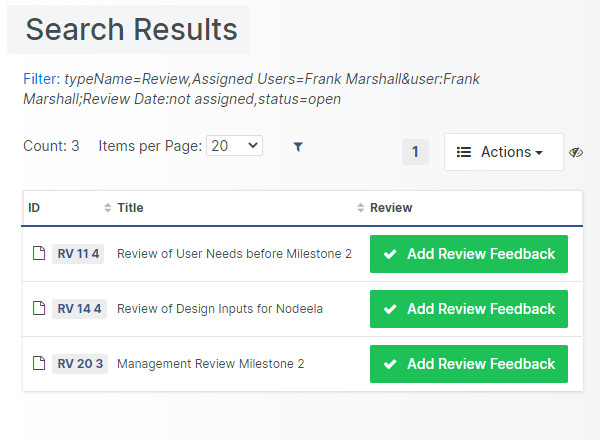
    Reviewing is also a notoriously time-consuming activity. By tightly integrating a collaborative design review process into Aligned Elements, much time and effort is saved. The review status and post-review modifications of each individual Design Control Item are carefully tracked.  

    Instant revision comparison, highlighting of unreviewed changes, and automatic review document generation saves time and reduces error throughout the project.


  • 100% Change Control. Zero friction.

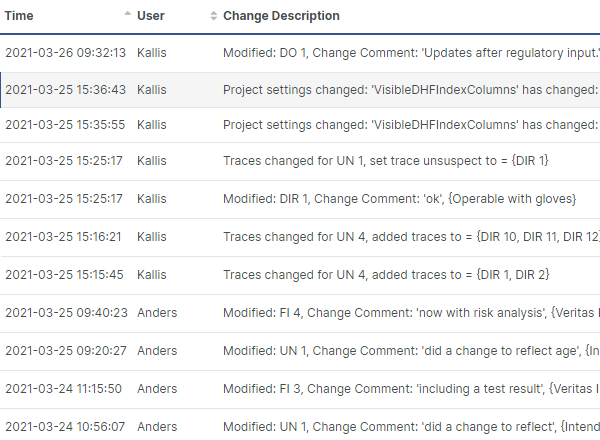
    To achieve clarity at every step., knowing exactly who changed what, when, and why is a prerequisite. With change control occurring automatically, teams work with confidence. Communication improves, and regulatory risk is minimized without disturbing your flow.

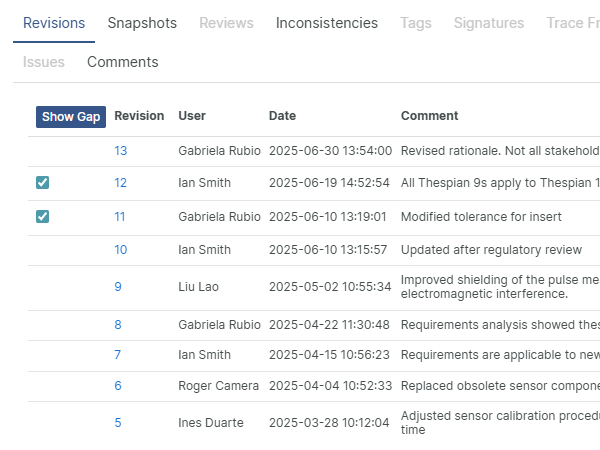
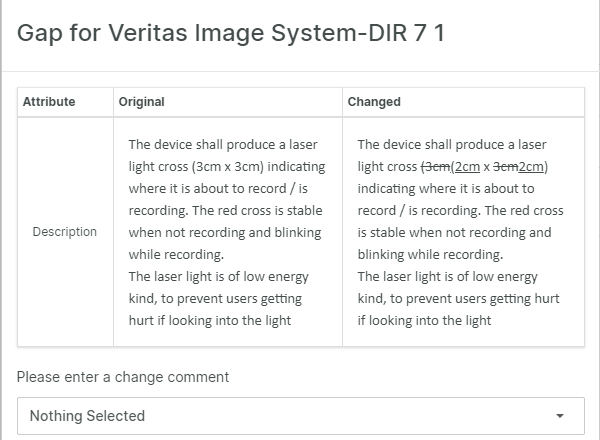
    All changes made to all Design Control Items require a change comment from the user, explaining the reason for the change. In this fashion, each change is tracked including why, when, what, and by whom.

    The modified item automatically gets a new revision number and can at later stages be compared to previous revisions.

  • An Audit Trail for compliance and accountability

    Trust is built up on accountability. With an audit trail, every change in your design process is documented and explained, turning compliance from a burden into a built-in strength.

    By capturing the full context of each modification, you ensure accountability is always clear and effortless to demonstrate.

    All changes made in the project, including modification, trace changes, and other actions, are recorded in a chronological audit trail.

    Each Design Control Item has its own revision history readily available in the Document Object form for analysis and comparison.

[rocket]

Accelerate your journey to CE Mark and FDA approval

Try aligned elements 30 days for free!

Start Today


Genuine Voices, Tangible Results

Discover world-class Design Control Management

Continue reading

  • Icon: <i class="fa-solid fa-scale-balanced"></i>
  • MDR (EU 2017/745)

    The European Union's Medical Device Regulation (MDR) regulates the medical device market in the EU.

    Aligned Elements facilitates the generation and management of the Technical File including Design Control Management, Risk Management, V&V management as well as creating the Documents, reviews, approvals and signoffs.

    Benefit from existing checklists and GSPR content to streamline your product development process, reduce the risk of errors and omissions, and ensure compliance with the MDR.

  • IVDR (EU 2017/746)

    Just like for MDR, Aligned Elements supports Technical File Management including the management of Requirements, Risks, Verification, Validation, Document, Traceability and much more. 

    Aligned Elements supports Design Development aligned with ISO 13485 and Risk Management aligned with ISO 14971.

    The General Safety and Performance Requirements (GSPR:s) from Annex I in IVDR is available to all Aligned Elements customers as an importable data package to kickstart your IVDR development.

  • QSR, FDA CFR 21 Part 820

    Aligned Elements provides you with excellent design control as required by the Quality System Regulations (QSR).

    Your DHF is maintained including all your requirements, specifications, tests, and risk artefacts.

    End-to-end traceability, integrated version and review control, document management, and audit trail, all these things covered directly in Aligned Elements.

  • ISO 13485:2016

    Aligned Elements has been designed to fulfill the design control versioning, tracing and reporting requirements from ISO 13485.

    We will help you enforce your Quality Management System and manage the Technical File with minimal effort.

    Use Aligned Elements to create auditable QMS and Technical File documents with confidence. We make sure your document contains the correct information, automatically analysed and verify by the system.

  • ISO 14971:2019

    Risk management for medical devices is a central part of the DHF. Whether you require a Preliminary hazard analysis (PHA) or an FMEA (or both), Aligned Elements will keep you covered.

    We believe that a very important part when it comes to risk management is to maintain the analysis as an integrated part of your DHF.

    Specifications may be analyzed for the FMEA, measures implemented by Requirements and thoroughly tested.  

  • IEC 62304-1:2015

    Use your Risk Analysis to apply the correct safety classification to your software items.

    Depending on the classification Aligned Elements guides you to refine the documentation work with detailed design and unit testing.

    You may in the same way capture the rationale for Safety Classification A.

  • IEC 62366-1:2015

    The usability engineering file is an integrated part of your DHF consisting of identifications of use cases, risk analysis of use scenarios and establishing corrective design.

    Aligned Elements provides you with good tools for all of these disciplines also when it comes to reporting your usability engineering actions.  

  • Cyber Security

    Cyber Security Risk Assessment templates help you assess the Cyber Assets, Threats, Vulnerabilities, and Adverse Impact of your system, in line with the FDA Cybersecurity Guidelines as well as AAIM TIR 57, IEC 80001, MDCG 2019-16 and other guidelines.

    Conduct your medical device risk assessment in Aligned Elements and integrate the resulting Design Control Items in the overall development traceability.

  • EN 60601-1:2006, IEC 60601-1:2005

    For Medical electrical equipment, one main burden on a medical device manufacturer lies in establishing the Risk Analysis required for the testing of compliance.

    In this area, you can make good use of Aligned Elements to simplify the process by tracking potential hazards from 60601-1 into the Risk Analysis in Aligned Elements and also simplify the reporting by generating the TRF directly. 

  • FDA 21 CFR Part 11 compliant User Management and E-Signatures

    Aligned Elements implements the technical controls for 21 CFR Part 11. The integrated user management ensures that the right people in your organization have the correct access.

    All changes to your DHF are tracked and Aligned Elements automatically captures the project audit trail.

    In addition, we provide a prepared 21 CFR Part 11 assessment to be completed with your specific local procedural and administrative controls.  

[rocket]

Accelerate your journey to CE Mark and FDA approval

Try aligned elements 30 days for free!

Start Today


Genuine Voices, Tangible Results

Discover world-class Design Control Management

Continue reading

  • Icon: <i class="fa-solid fa-network-wired"></i>
  • Integration with Atlassian Jira

    Initially having started as a bug tracker, Atlassian Jira has, together with other tools from Atlassian, such as Confluence and Stash, formed a powerful set of software ALM tools.

    The integration with Aligned Elements allows Jira Issues to be created, edited and traced straight from the Aligned Elements client. Recording test defects as Jira Issues during Test Execution without ever having to leave the Aligned Elements UI.

  • Integration with GitLab

    Integrate GitLab with Aligned Elements to trace from Design Control items in Aligned Elements to GitLab issues and tasks.

    Access, create, edit and trace GitLab items directly from Aligned Elements without any extra deployment or synch operations.

    Let Aligned Elements features such as Queries, Inconsistencies and Word Integrations operate on your GitLab issues.

  • Integration with GitHub Tickets

    GitHub is one of the most popular version control systems used today. Although primarily used for source code control it also includes ticket/item tracking.

    Aligned Elements access the GitHub database directly and make the items available for editing. GitHub tickets can be created, modified, traced, analysed, queried, and reported from Aligned Elements. 

  • Integration with Azure DevOps

    The Azure DevOps integration lets you create, edit and trace Aligned Elements items to Epic, Stories, Bugs and other Azure DevOps artifacts.

    Integrating Azure DevOps items in your medical device traceability in Aligned Elements gives you the best of both worlds!

    Aligned Elements access the Azure DevOps repository directly and makes any synchronization operations redundant. The integration is part of the Aligned Elements configuration and requires no extra deployment actions.

  • Integration with Subversion

    It is now possible to directly connect Aligned Elements to your Subversion Repository. This connection can be added as an additional field to any existing Design Control type.

    A typical scenario would be to specify a specific check-in when closing an Issue which allows Aligned Elements to trace all the way down to the source code.

    It is also possible to create a completely new type, for example, a “Source Code Item”. This type can then be included in the traceability landscape of your project.

  • Integration with Redmine

    Use Aligned Elements integration with the Redmine ticket system to integrate Redmine tickets into the Design Control traceability.

    Create Redmine tickets from Aligned Elements on the fly when bugs are found during test execution.

    Let Aligned Elements inconsistency checks validate the state of your Redmine items and use Aligned Elements bi-directional Word Integration to incorporate Redmine tickets into your DHF documents.

  • Integration with Enterprise Architect

    Leverage the powerful System Integration models of Enterprise Architect in your Aligned Elements traceability.

    Enterprise Architect Diagrams are displayed in Aligned Elements items through a live connection with the Enterprise Architect repository.

    This permits traceability between Design Controls in Aligned Elements and models in Enterprise Architect diagrams as well as the incorporation of EA diagrams in Aligned Elements bi-directional Word reports.

  • Integration with Trac

    Trac is one of the most widely used open-source bug tracking systems. With a tight Source Code Management integration, it is especially popular among software developers.

    Trac tickets appear as any other Design Control Item Category in the Aligned Elements client and can be modified, traced, queried, and exported.

  • Integration with Countersoft Gemini

    Aligned Elements integration with Countersoft Gemini makes the Gemini issues appear in the Aligned Elements client as any other Design Control Item category.

    Using direct access to the Gemini database, no redundant information (apart from traces) is stored in Aligned Elements. Gemini issues can be created, modified, traced, analysed, queried, and reported from Aligned Elements.


  • Integration with Perforce/Helix ALM Core

    Perforce, aka Helix ALM Core, can associate each change in the source code repository with a ‘job’.

    Aligned Elements will let you create and edit these jobs directly in the UI and maintain a live link to the data within Helix ALM Core.

    You may include a reference to any job within your traceability, very much like our internal management of Issues.

  • Integration with Microsoft TFS

    Microsoft Team Foundation System is the state-of-the-art software application lifecycle management system from Microsoft.

    Aligned Elements uses direct access to a selected set of Work Items and integrates them in the workflow of AE:s native Design Control Items, effectively tying the DHF together with source code tests and check-ins. 

    TFS Work Items can be modified, traced, analysed, and exported from Aligned Elements.

  • Integration with Microsoft Entra ID

    Aligned Elements now integrates with Microsoft Entra ID (formerly Azure Active Directory), enabling single sign-on (SSO) with the same credentials used for Microsoft 365 and other business tools.

    This eliminates multiple logins, reduces password fatigue, and makes daily access faster and more secure.

    This integration enhances both security and usability, supporting medical device professionals with a modern, compliant, and user-friendly platform.

  • Integration with TestResult.io

    TestResults.io is a no-code test automation platform that runs advanced end-to-end software tests.

    The integration between Aligned Elements and TestResults.io enables automated test execution results in TestResult.io to flow directly into Aligned Elements traceability.

    The integration reduces manual effort by allowing automated software tests to be leveraged in your overall traceability.

[rocket]

Accelerate your journey to CE Mark and FDA approval

Try aligned elements 30 days for free!

Start Today


Genuine Voices, Tangible Results

Discover world-class Design Control Management

Continue reading