EN

The Word Aligned Elements Add-In/Plugin does not show the project explorer.

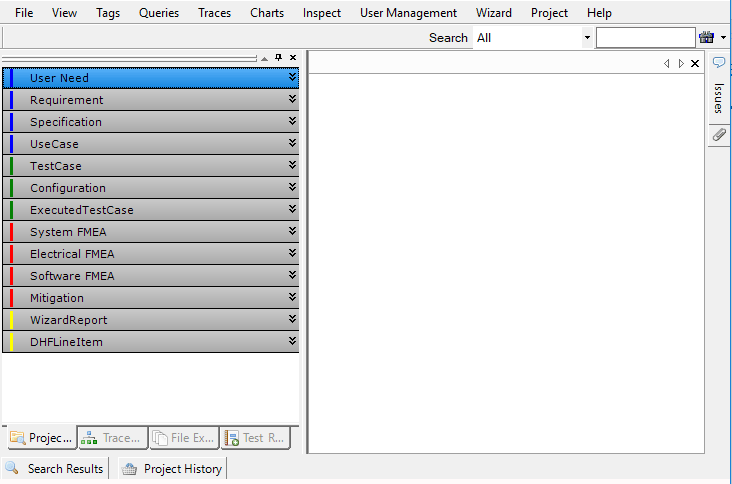
After starting MS Word, the Aligned Elements Word Add-on/Plugin is visible, but it does not show the Navigation Bar or Project Explorer, only the Message View at the bottom of the pane: 

Empty Action Pane

In order to fix this, select Main Menu => File => Options.

In the dialog, select the section called "General".

In the top most section called the "User Interface options", tick/select the check box for "Optimize for compatibility" to activate it.

Word Options

When completed, restart MS Word for the change to take effect.

I use Office 2007 (or above). How do I get rid of the Security Alert I get each time I open a Word Document with Aligned Elements?

You need to define the AE application directory as “Trusted Location”. If you hold the mouse over the file path string in the dialog "Security Alert" the Aligned Elements application directory is displayed. Click “Open the Trust Center” in the dialog (down to the left) and added the application path as a trusted location and add the option “Trust all subfolders”.

The Word Action Pane does not display in my Word Integration. What have I done wrong?

Note! For Word 2003, you must use Word 2003 Professional SP1 or later. Word 2003 Standard or Small Business will not work.

There are three possible reasons: a) the word templates are corrupt or b) the Action Pane is hidden by Word but accessible or c) it is inaccessible all together. Click Ctrl-F1 in word (Word 2003) to attempt access the general task pane and see if you can find the Action Pane in the drop down list.

If you cannot see it, it might also be the case that the Action Pane Active X component is blocked on your computer. Check for the registry key:

HKEY_LOCAL_MACHINE\SOFTWARE\Microsoft\Internet Explorer\ActiveX Compatibility\{5f61f809-422a-4152-91f5-9ec1b935efd7}

If you find it, delete it and start Aligned Elements again. This time the Action Pane should be accessible in Word.

If this does not correct the error, you need to reinstall Visual Studio Tools For Office. VSTO 2005 SE can be downloaded here. When you have downloaded and installed VSTO, then repeat the installation of Aligned Elements.

If that also fails, then send us the logfiles and we'll check if the templates are corrupt.

I use Office 2007. When I open a word document I get an error message claiming that the customization could not be copied due to security issues. What is wrong?

If it is the case that your windows user name contains a blank space (like "Peter Stein"), then Aligned Elements is not able to copy the customizations correctly. We are working on a solution for this problem.

Whenever I close a Word document, I get question about saving Normal.dot. This is really annoying.

Do the following:

  • Make sure that no Word instances are running
  • Start Regedit, (Start->Run->Regedit )
  • Navigate to HKEY_LOCAL_MACHINE\SOFTWARE\Microsoft\Office\Word\Addins
  • If there are any Add-In entries listed then set the LoadBehaviour entry to 0 (instead of 3) for the first Add-In
  • Start Aligned Elements and Word and check if you still have the Normal.dot problem.
  • If you still have the problem, set the LoadBehavior entry back to 3 and try the next Add-In in the list.

Suddenly it takes forever to open Word Documents in Aligned Elements. A normal word document opens fast, but an AE word document takes considerably longer to open.

This is a known phenomenon when using the Trend Micro Antivirus software. In the Antivirus "Behavior Monitoring" section, add ProjectView.exe (the Aligned Elements main exe) to the Approved Program List.

Can I print an old revision of a Test Case?

Yes, you can. Create a new File Object and attach a blank Word Document. Select the Test Case (or any Document Object) you want to insert and use the "Insert Frozen Objects" button in the tool bar to specify which revision of the object you want to insert. When the object has been inserted you can use Word's normal print-out mechanism to print it out.

When I drop objects in Word, the document is left blank even though the application says that they have been inserted. Why?

This is caused by the application "WinZip email companion V2". You either have to uninstall it or install version 1 of the application.

How can I import existing requirements/specifications from a Word Document?

See AE User Manual section 4.10 for details.

When I open a word document from Aligned Elements, I get this message

You need to reinstall Visual Studio Tools For Office. VSTO 2005 SE can be downloaded here. When you have downloaded and installed VSTO, then repeat the installation of Aligned Elements.