EN

Do the following:

  • Make sure that no Word instances are running
  • Start Regedit, (Start->Run->Regedit )
  • Navigate to HKEY_LOCAL_MACHINE\SOFTWARE\Microsoft\Office\Word\Addins
  • If there are any Add-In entries listed then set the LoadBehaviour entry to 0 (instead of 3) for the first Add-In
  • Start Aligned Elements and Word and check if you still have the Normal.dot problem.
  • If you still have the problem, set the LoadBehavior entry back to 3 and try the next Add-In in the list.

This is a known phenomenon when using the Trend Micro Antivirus software. In the Antivirus "Behavior Monitoring" section, add ProjectView.exe (the Aligned Elements main exe) to the Approved Program List.

Yes, you can. Create a new File Object and attach a blank Word Document. Select the Test Case (or any Document Object) you want to insert and use the "Insert Frozen Objects" button in the tool bar to specify which revision of the object you want to insert. When the object has been inserted you can use Word's normal print-out mechanism to print it out.

This is caused by the application "WinZip email companion V2". You either have to uninstall it or install version 1 of the application.

See AE User Manual section 4.10 for details.

You need to reinstall Visual Studio Tools For Office. VSTO 2005 SE can be downloaded here. When you have downloaded and installed VSTO, then repeat the installation of Aligned Elements.

Yes, you can. Select "Display Inconsistencies" for the objects you want to check and filter on the Inconsistency called "Document Object Not In File".

In MS Word, open the menu Item Tools -> Options and select the Tab Page called "General".

Deselect the 5th option called "Confirm conversion at Open" and try again.

You are probably using Word 2003 Professional without any Service Pack. You must install Service Pack 1 or higher.

The error says "Format Error: the specified format is invalid. (01-2426)".

This occurs in the Aligned Elements Windows Client. 

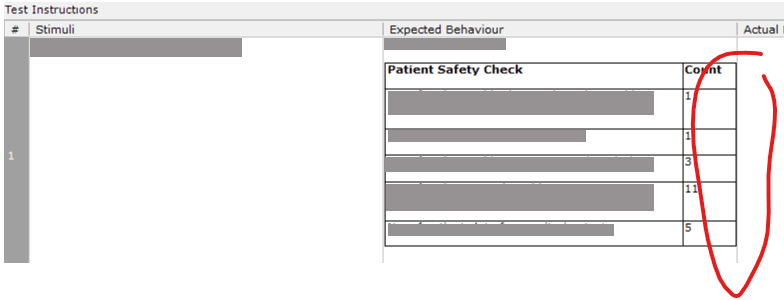
This effect has to do with tables used (also called nested tables) in cells in the Table Attribute.

There is a known issue when the right edge of a nested table “touches” the column separator as in the image below.

 Table_With_Problems.png

How to solve it

You avoid this by increasing the width of the Object form (by maximizing the Aligned Elements application GUI or use a large monitor or collapsing the Project Explorer or making the Project Explorer narrower etc.) or making the table narrower.