EN

With the Hotfix Aligned Elements V2.3 Service Pack 1 (2.3.2.10145) we have fixed a small number of crucial bugs fixing some serious inconveniences in Aligned Elements V2.3.

Note that these issues in Aligned Element do not pose any danger to the data integrity of the projects. It is only a matter of fixing GUI problems that degrades the usability.
What's New

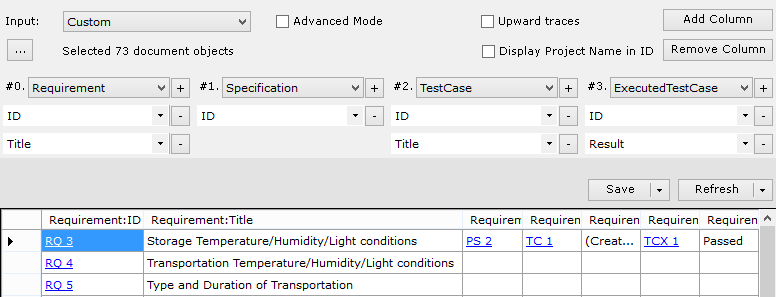
Trace Table Designer

Design on-the-fly trace tables directly in the Aligned Elements clients.
Run and inspect immediately or export and employ design as Trace Table Word Templates.

TraceTable1


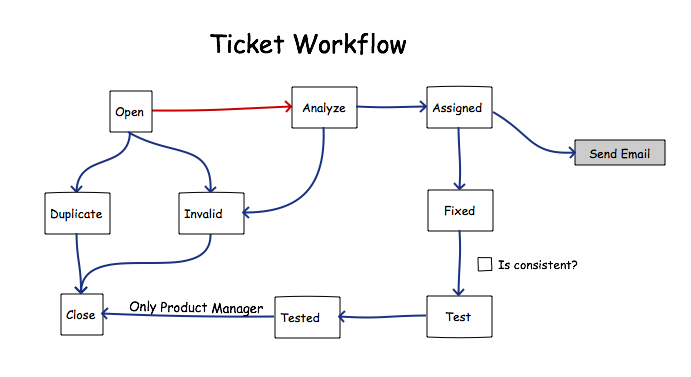
Flexible Workflows

Flexible, customizable workflows with rules and conditions to match your existing Quality Management System.
Improves collaboration, enhances process quality, and automates business processes.

Workflow


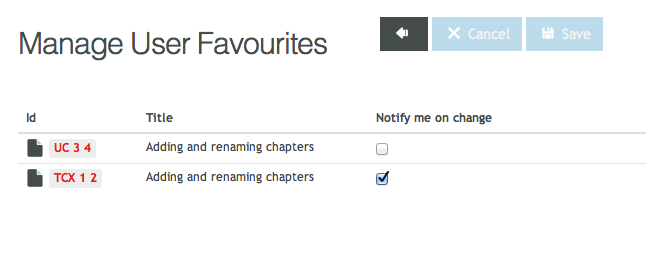
Email Notifications

Keep in sync with the team progress by subscribing to changes to any Document objects.
Automatic email notifications to assignees to increase collaboration and accountability.

Mange


What's changed

  • SQL Server 2014 compatibility
  • Web client Risk Management editors
  • Web client Trace Table Designer
  • Web client Query Designer
  • Mitigation sorting on Risk Reduction Type in FMEAs
  • Support for “Probability of Harm” and “Probability of Occurrence” in Risk Analysis
  • Export of old Document Object revisions
  • “Change comment”-query filter


Upgrade Now

With more than 90 enhancements, fixes, and usability improvements, this release is a recommended upgrade.

Find the installer to Aligned Elements V2.3 here.

{fastsocialshare}

From the very first day, we decided to integrate risk management into Aligned Elements. It is obvious to anyone within the industry that risk management and requirement-specification-verification-validation management are intimately connected. Still, many companies insist on keeping these two artefact collections separate in isolated systems. We think the management of all Design Control Items, including risk information, can be made more efficient with fewer errors if they are kept within one system.

Failure Mode and Effect Analysis in Aligned Elements

In Aligned Elements, we initially implemented FMEA as a risk analysis method. The FMEA is a very versatile risk assessment technique. It is widely adopted in the medical device industry and fairly straightforward to understand.

The implementation of FMEA:s in Aligned Elements goes as follows: a Failuremode entity holds a collection of Hazard entities. Each Hazard contains a cause with its probability, an effect with its severity, and an additional optional visibility parameter. A risk priority number is calculated based on the probability, severity, and visibility values. The Hazard can then be addressed with one or more Mitigations which, each in turn, reduce the RPN to a new value. 

All this entered risk information is subjected to Aligned Elements general features, including:

  • Individual IDs assigned to each entity
  • Strict version management of all changes made
  • Changes are registered chronologically in the project audit trail
  • Search and filter options can be applied using the Query Manager
  • Risk reviews can be performed using the integrated Design Review Module
  • The  risk information can be included in the Aligned Elements DHF Index

Based on our experiences of time consuming risk analysis work, we included a number of usability features to make the day-to-day work easier and to save time and resources: 

  • Automatic calculation of RPN
  • Automatic checks of RPN against thresholds
  • Intelligent reuse of mitigations
  • Highlighting of unmitigated risks
  • Highlighting mitigations that have not been implemented
  • Automatic Risk Summary generation
  • Control checks that applicable parts of the DHF have been subjected to risk analysis
  • Highlights which requirements/specifications/tests are affected by the risk analysis
  • Incorporation of risk entities into the overall trace landscape

One of the many reasons the FMEA is such a widely adopted technique derives from its versatility and flexibility. This permits the medical device manufacturer to apply the best possible fit between his risk analysis approach and his existing products, processes, and organization.

Aligned Elements provides a number of customization possibilities to ensure that a wide range of FMEA variants can be applied, including:

  • Customizable naming of the parameters and entities
  • Customizable Probability, Severity and Visibility ranges
  • Customizable thresholds for unacceptable risk, ALARP, and acceptable risk
  • Customizable formulas for RPN calculation
  • Customizable look and feel of the risk report
  • Expanded Risk reports to include traceability to mitigation implementation according to client QMS
  • Multiple FMEA types in the same project

Enter Preliminary Hazard Analysis 

Not all our customers favored the FMEA as a risk analysis method. We, therefore, contacted ProSystem AG,  a renowned expert company in the area of medical device risk management and an active member in several norm groups (such as IEC 62304, IEC 60601-1) and jointly developed a Preliminary Hazard Analysis (PHA) method in Aligned Elements as an effective complement to the existing FMEA method.

According to theory, the PHA is a top-down approach, using a list of known hazards as input for the risk analysis. The PHA method can be applied in the early stages of the development process and does not presuppose detailed knowledge about the system to be analyzed. 

The Aligned Elements Preliminary Hazard Analysis uses terminology aligned with ISO 14971 to describe Potential Hazards, Harms, Measure entities, etc.. 

As opposed to the FMEA, our PHA implementation uses a stricter separation of Causes and Harms from the Risk Analysis aggregator (the Risk Analysis entity corresponds to the Failuremode entity as a collection of Causes and Harms under a particular subject), where Causes and Harms are captured as separate entities. This allows more efficient reuse when causes and harms are reoccurring throughout the risk analysis, saving time when creating and managing the risks. Keeping the Causes in separate entities further permits them to be used as the link between IEC 62304 Software Items and the risk analysis in accordance with the IEC 62304.  

In the PHA, we have expanded the Cause entity to include a “Cause source”-parameter to enable a more precise analysis of risk-causing factors. Correspondingly, the Harm entity has an additional “Has Effect On”-parameter for a more granular designation of the affected agent.

Furthermore, in accordance with best practices from ISO 14971 and other risk norms, the Measure entity contains an additional parameter to explicitly designate risk control approaches such as "Design for inherent safety", "Adding Protective measure", "Providing Information of Safety" etc. This risk control approach can further be connected to the risk reduction parameter controlling the new RPN to ensure that a given risk control approach always results in a consistent risk reduction.

With the Preliminary Hazard Analysis, we have created a capable complement to the existing FMEA risk analysis implementation. We have enlisted the help of renowned industry experts and used input from our client base to build an implementation more aligned with ISO 14971 and industry best practices. The decoupling of the PHA entities in separate Document Object types permits more efficient information reuse than the FMEA implementation. Additional parameters enable the user for a more in-depth analysis of risk drivers.  This has been achieved without compromising the benefits of strict version control, integrated consistency checks, and flexibility that Aligned Elements offers.

If you are interested in a demonstration of the Aligned Elements Preliminary Hazard Analysis, please contact us

Learn more about riskmanagement in Aligned Elements.

Let us show you how riskmanagement works in Aligned Elements during a live demo. 

Zühlke Engineering AG in Zürich (http://www.zuehlke.com), has been
evaluating Aligned Elements during the spring and we recently had the
opportunity to speak with Mr. Claudio Schödler, project manager at Zühlke,
about the results.

"Having finished the evaluation of Aligned Elements after 3 months of
careful study, we can conclude that it is a highly suitable application for
medical device development projects." Mr. Claudio Schrödler summarises.

"The tight integration of the risk management functions is a particularly
strong advantage when working in this industry.", Mr.Schödler continues.
"In comparison with other similar applications, we have noted that Aligned
Elements excels in terms of ease of use and reporting. Most teams will be
up and running in a very short time.”

"As you work with the application, it becomes apparent that the Aligned
team has focused on easing the documentation burden, and succeeds in doing so very well.”

On July 19th, 2014, we release Aligned Elements V2.2 (2.2.7.9739) which includes the new Aligned Elements Web Client.

The Aligned Elements Web Client enables browser-based access to any Aligned Elements project from any remote location.

Login

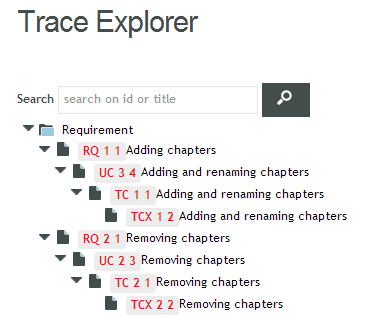
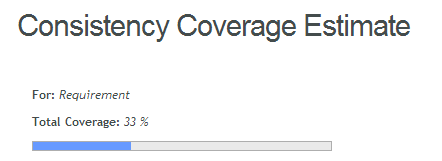
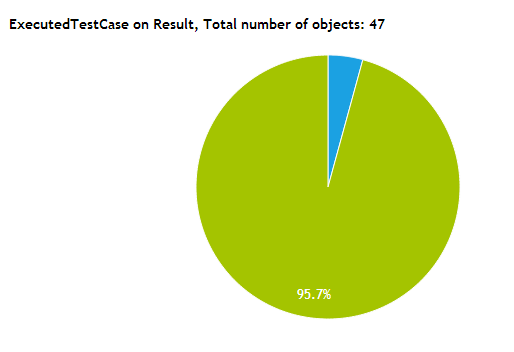
 TraceExplorerConsistencyCoverageWebChart

It is an efficient way to involve and benefit from external project stakeholders such as customers, suppliers, distributed marketing teams, external testers, and other remote team members in the Design History File collaboration process.

The web client permits the user to perform core activities such as creating, updating and tracing Document Objects, managing chapter hierarchies, inspecting the project content, running queries, performing free text searches, etc.

The new interface is optimized for easy access to core Aligned Elements functions and combines high performance with a modern interface to enhance the user experience.

For the Windows Client V2.2, we have added a number of new features, most notably:

  • Bookmarking favorite Document Objects
  • Inclusion of the Revision History in Document Object XML exports
  • Optionally including old revision data of Document Objects in Excel reports
  • Copy users to other projects in order to minimize User management effort

We hope that you will enjoy these improvements.

Zühlke Engineering AG in Zürich (http://www.zuehlke.com), is currently evaluating Aligned Elements for use in their product development.  

“We were excited when we found Aligned Elements, since we have a large segment of Medical device projects.", says Claudio Schödler, Project Manager at Zühlke. 

"Currently, we are running a smaller in-house project where all design items are captured in Aligned Elements. All created documents will, later on, be delivered to the end customer. The initial effort has been exceptionally small since the tool is easily configurable and really focuses on everyday tasks.", Mr. Schödler continues. "The evaluation will continue until the summer and will be concluded in an evaluation report.”

We at Aligned are looking forward to the evaluation report and any insights from the skilled Zühlke team!

On April 16th, 2014, we release Aligned Elements V2.1 Service Pack 2 (2.1.35.9472).

Aligned Elements V2.1 SP 2 is focusing on bug-fixes and ships with 30+ fixes.

This service pack also includes some minor fixes requested by our users, in particular in the area of risk reporting.

Aligned Elements V2.1 SP 2 can be downloaded here.

On January 31st, 2014, we release Aligned Elements V2.1 Service Pack 1 (2.1.28.9239).

Aligned Elements V2.1 SP 1 contains a number of new significant improvements in Aligned Elements Word integration, most notably: 

  1. Optional usage of several Word template sets in a single project 
  2. Optional display of all linked objects in Word Project Explorer 
  3. Forced update of Word documents
  4. Support for MS Word x64 bit installations 
  5. Support for .docm files

This release also includes: 

  • Microsoft TFS Integration
  • Query RPN filter for Objects below and above a certain RPN
  • Query RPN Threshold filter for Document Objects above/below a defined thresholds

Aligned Elements V2.1 SP 1 builds on the improved feature set of AE V2.1 which strengthens Aligned Elements claim to the leading position of Design History File Management solution providers.

On August 30th, 2013, we release Aligned Elements V2.1 (2.1.1.8829).

Aligned Elements V2.1 is the new major release from Aligned AG, containing a number of new features for increased control and improved transparency. These include:

  • Breakdown Charts with drill-down capability
  • Consistency Coverage Summary
  • Generation of trace reports to Excel
  • MS Word 2013 compatibility
  • Category Filtering in Project Explorer
  • Integration support for the Countersoft Gemini Issue Tracker

This improved feature set strengthens Aligned Element's claim to the leading position of Design History File Management solution providers.


{fastsocialshare}

{fastsocialshare}

Thank you very much for joining us for this Sharpen your Skills 2026 session!

Find the recordings of the four expert sessions below. See you again in the fall!

Session Recordings

From Compliance to Risk: Rethinking Medical Software Testing

Presented by: Tobias Müller, CTO, TestResultsIO

Decoding Essential Performance in IEC 60601-1: The Hidden Difference That Could Make or Break Your Medical Device


Presented by: Beat Keller, Managing Director, Regulatory Expert, SMDC Swiss Medical Device Consulting GmbH

Testing the untestable: Computer Software Validation of AI functionality

Presented by: Regina Geierhofer, Chair of CLC TC62, Regulatory Affairs Professional