
EN

{fastsocialshare}

Many development teams have good tooling in place to organise the daily work. My personal favourite hub for information is a good solid issue tracking system. The simpler the system the better!

With an issue tracking system you can easily track:  

  • What is to be done?
  • Who’s on it?
  • When is the deadline?

An “issue” can be created for several reasons: to capture a work task, track a bug, take down to-do’s, or just set up a reminder. The common denominator is to organize your work in a team environment.

In a modern era, using an issue tracking system is a cornerstone of efficient software development and is today considered state-of-the-art. Most issue tracking systems facilitate searching, sorting, listing, querying, assigning, and tracking issues for optimal teamwork and efficiency. Nowadays, many hardware designers have of course also learned to appreciate these useful tools.
Now, as good as these tools are to manage and organise work when it comes to maintaining a formal Medical Device technical documentation / Design Control documentation, they lack quite a bit of structural guidance.

Watch out for the following misuse-of-issue-tracking-system-smells:

  • You find yourselves defining a large number of different issue types for requirements types (User Stories, Use Cases, and Specifications (or even subtypes thereof))
  • You struggle to structure issues in a sensible way to produce some logical grouping
  • You have trouble to analyse the current traceability
  • You spend a disproportional amount of time tweaking your issue tracking system to produce the reports you want
  • You have to buy and configure a large number of add-ons to cover things like risk assessments, DHF indexes, or traceability reporting
  • Your acquired add-ons do not play very well together
  • You have to export issue data and edit it manually in order to get your desired result
  • Your non-software teams are not finding value working on a tool configured for software development

The obvious reason for the points above is that issue tracking systems have been developed for a particular reason, namely organizing and following up on tasks.

I bet you are not using Excel to write legal contracts or letters. Likewise, you are hopefully not using Word for calculating a budget.

Each software has been built for a particular purpose and if your purpose is Design Control Management for Medical Device Technical Documentation, there are other and better tools available.

The right tool for the right job

This does not mean that you have to give up your Issue tracking software. Instead, integrate it in a powerful tool-chain.

We, at Aligned AG, recommend you to keep your existing Issue tracking software and integrate it with Aligned Elements for optimal value creation. In most DevOps tool-chains, the Issue tracking system acts as the spider in the net and is crucial for efficient software team collaboration.

Moreover, issue tracking systems are usually well integrated with other development activities such as:

  • Bug tracking
  • Software development planning
  • Version management
  • Build management

To structure your documentation, on the other hand, we are convinced that a purpose-built tool like Aligned Elements will help you reach your goal faster and more efficiently. Regulations such as MDR, IVDR, or the QSR require a formal development process. You shall describe the structure dictated by the development process in your Quality Management System, but to convey this structure properly, the team needs to be thoroughly guided.

The expected result after a long project needs to be clearly stated at the beginning of your development journey! (i.e., do NOT use a Wiki!).

Our obvious choice for this is of course Aligned Elements.

Maintain the traceability all the way down to your activities

For maximal gains, integrate Aligned Elements with your issue management system of choice.

In Aligned Elements, we support live connections to a growing list of the most popular issue tracking systems.

This allows you to create and modify Issues directly from Aligned Elements and trace from any:

  • Design Input / Requirements
  • User Stories
  • Features
  • User needs
  • Specifications
  • Tests cases and results

directly to issues in the issue tracking system of choice.

The traces will be part of your Aligned Elements traceability monitoring and reporting. Aligned Elements even sets a source Aligned Elements hyper-link in the target issue automatically in order to designate the Aligned Elements tracing to it. The issue data is kept in the issue manager only and Aligned Elements keeps a live link to that data. There is no need for error-prone synchronization between the systems.

Execute test cases in Aligned Elements but create software bug reports in your issue tracking system without having to leave the Aligned Elements context.

Generate agile artefacts like User Stories or Epics in your issue tracking software directly from Aligned Elements with traces being set automatically.

Lever Aligned Elements consistency checks, query capabilities, and powerful word reporting features on the issues in your issue tracking system. 

Please contact us at This email address is being protected from spambots. You need JavaScript enabled to view it. if you need help to integrate an issue tracking system into your Aligned Elements documentation system. We’ll be happy to assist!

 

{fastsocialshare}

Medical Devices Development - Sharpen your Skills 2017

May 30th, 2017 | Marriott Courtyard, Oerlikon

All options availableCompliant and Efficient Medical Device Development

An impossible combination? 

Join us to gather concrete and practical advice on how to meet trending medical device development challenges in 2017.

We have called on a group of experienced industry experts to share their latest best practices on how to eliminate problems with you.

Register now to reserve your seat!

We look forward to seeing you at this event. If you have any questions or information requests, please don't hesitate to This email address is being protected from spambots. You need JavaScript enabled to view it.


Key Learning Objectives

EU MDR: What really matters to manufacturers. And when.

What does the new EU MDR have in store for you? The 566 pages of the MDR contain a number of important changes for the medical device industry. Meet the challenges in time and in the right order.

Hansjörg Riedwyl, CEO | ISS AG

Verification: yesterday, today & tomorrow

Test documentation takes up more than 50% of the total Design History File / Technical File. Time which could be better spent. Imagine 100% regression tests in a single day, for every release. Can it be made possible? Learn more in this session.

Tobias Müller, Managing Director | Progile GmbH

The seven sins of Clinical Evaluation Report writing

Regulatory requirements on clinical evaluation data have risen considerably during recent years. What are the best (and worst) practices in writing and updating state-of-the-art medical device CER:s?

Dr. Bruno Walter, Managing Director | Medical Minds

Digital Signatures = Quicker DHF Document Releases?

E-signatures boost document release efficiency according to business experts. Medical device development involves an awful lot of documents. So why should not everyone use e-signatures?  

Karl Larsson, Medical Device Documentation Expert | Aligned AG


Time and Place

  • Date: Tuesday, May 30th
  • Time: 08:30 - 13:00
  • Place: Hotel Marriott Courtyard, Oerlikon Zürich

Presentations are held in german. Slides are written in English.

Target audience

This event is aimed at medical device development professionals, project managers, QARA professionals, R&D personnel, and other industry professionals engaged in medical device development.

Registration

We are looking forward to seeing you at this seminar!

Registration Fee: 125 CHF

30% early bird discount for registration before May 10th


Location

Adress: Hotel Marriott Courtyard, Max-Bill-Platz 19, 8050 Zürich


About Aligned AG

Aligned AG provides Aligned Elements, a Medical Device ALM system that accelerates and ensures compliant Design Control documentation for medical devices. We assist our clients in developing regulatory compliant products within shorter time-frames, to lower costs and with higher confidence. 

{fastsocialshare}

Documenting the design controls for a medical device is a mandatory exercise in our industry. Regulations describe what the documentation must show. Standards describe harmonized ways in which regulations can be fulfilled. Your quality management system should, in the best case, describe which process you need to follow in order to satisfy the standards and regulations, and finally, your company templates are what you use to finally pen it down.

However, regardless of the multitude of support systems, at the end of the day some of us given the task to provide a document, will sit down in front of the computer and think: 

But what exactly should I write?

Here is where we can help. The Aligned Elements Extension section contains more than 50 importable plug-and-play content packages that can help you accelerate the documentation process by leaning on collected experiences and best practices. Our extensions exemplify how Aligned Elements can be used to solve ubiquitous medical device documentation problems.

brick

These extensions contain things like:

  • Example Design Controls such as 21 CFR Part 11 Requirements, ISO 14971 Harms, etc.
  • Ready-made configuration packages for e.g. IEC 62304 and IEC 62366
  • Regulatory Wizards, such as finding out if your software is a medical device
  • Queries
  • XSLT - transformations to transform Aligned Elements into the desired output format

To make this even better: all extensions on our website are free to our customers.

Today, we added a new package of 120 Infusion Pump requirements exemplifying the Design Input for an Infusion Pump device. Let us help you. If you have questions about our extensions, please This email address is being protected from spambots. You need JavaScript enabled to view it. for more information.

{fastsocialshare}

Not long ago I sat down and had a really good talk with Ilari Henrik Aegerter from House Of Test. Ilari has an extensive background in high-quality testing and is one of the leading opinion makers in the area of context-driven testing. Ilari is also a strong advocate of Exploratory Testing and I challenged him to explain how Exploratory Testing could fit into the world of strict and regulated medical device development.

"One way of thinking about testing is value creation. Value is created by increasing the knowledge about the system.” starts Ilari, “Through testing, you gather information about your system’s desirable and undesirable behavior. Now, some testing methodologies accomplish this more efficiently than others.”

"In traditional, scripted testing, the task is to verify that the system behaves according to a formally specified input, a.k.a "confirmatory checking". I see this approach a lot in the medical device industry, often accompanied by extensive documentation, meticulously describing the input and output.” 

“The drawback of this approach is that it only traverses a very narrow path of the system. The generated results is equally meager when it comes to unveiling previously unknown knowledge about the system. It also abstains from tapping into the creativity and system expertise of the tester. 

Let me make this clearer with an illustration.”

 Ilari

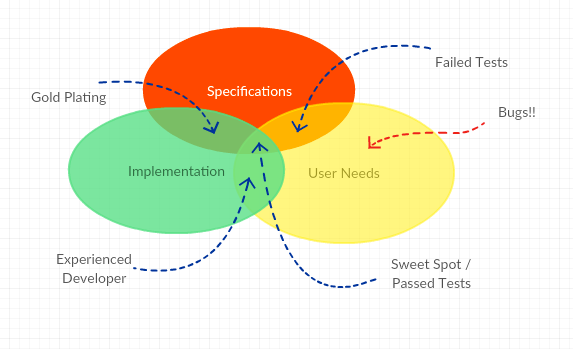
“This diagram describes a medical device. As you can see, we have three ways of looking at the product:

  1. The User Needs: this area represents the features set the customer actually wants.
  2. The formal Specifications: this area is made up of the Design Controls, where the manufacturer attempts to formally define the system he is planning to build.
  3. The actual Implementation: this final area represents the feature set the instrument actually supports 

In the ideal case, a medical device is characterized by a perfect intersection between all three areas.

Now, let's evaluate what happens when this is not the case.

"Specified but not implemented" - This area translates to turn up as failed tests in the medical device documentation, something that becomes accentuated in companies that focus on verifying formal specifications. Not uncommon in the medical device industry.

"Implemented and specified but not covered by User Needs" - Sometimes called "Gold Plating". From a scripted test perspective, this area is going to transform into passed test cases. One might question the value of implementing things that the Users don't need, but there might exist business reasons that explain this area.

"Implementation and User Needs intersect but are not covered by Specifications" - This is the result of an experienced developer who knows what the User Needs even though it is not specified. Unfortunately, this part is not going to be covered by the formal verification so we can only hope that the implementation actually works.

Finally, the most important area is represented by the "unmet User needs". This area is going to come back as bugs and change requests in the post-market phase. Despite having done the things right, we have apparently failed to do the right things. Some of these user needs might have been explicitly left out for cost reasons or with the intention to be implemented later. However, the critical part consists of the "things we didn't think about".

And voila, here is where exploratory testing can make a big difference. By applying a broader testing mindset, not being constrained by the narrow path of formal specifications, wider test coverage is reached and more knowledge is obtained about the system. More knowledge is more value. The best part is that studies have shown that exploratory testing is much more efficient in finding bugs per time unit compared to traditional testing."

At this point, I asked Ilari if these unmet User Needs would not be uncovered during the Design Validation? Wasn't this exactly the objective of validation, to check that we have done the right things? 

"Partly", says Ilari, "the notions are related but not the same."

“In recent years, we have seen an increased focus on usability and human factor engineering in medical device development. We have also seen an increased regulatory focus on performing proper validation for each new release. The whole point of these disciplines is to engage the user's perspective since the user probably knows more about the final usage than the manufacturer. Usability and human factor engineering are valuable tools to emphasize, charter, and corroborate user needs in the design process.

Exploratory testing is focusing on similar issues. It leverages the creative and critical thinking of the tester, mimicking the thought process of a user. It challenges the tester as a domain expert and explicitly attempts to uncover tacit and unspecified needs."

I was still skeptical. "But, Ilari, we still need to be compliant with the FDA. We still have to show that the specifications are met and we still need to have documented proof. Exploratory testing makes a big point how traditional, scripted testing is obsessing about repeatability and documentation, indicating that these are not important steps." 

"That is not true.", Ilari responds, "I think this is a misconception about exploratory testing, i.e. that it does not test specifications and does not produce documented evidence. Of course, exploratory tests are documented. It's just that it might not use the same level of detail and that it better highlights undesired behavior, instead of only focusing on meticulously writing down everything that works as specified.” 

“My opinion is that exploratory testing generates more knowledge about the system. This is particularly valuable during the early development stages. If you have worked in the industry, you know exactly what I am talking about. At this stage, the specs are constantly changing, the device is continuously modified, a lot of factors have not yet stabilized and it is simply not efficient to start writing formalized test scripts at this point. During this phase, exploratory testing is the superior testing method for generating knowledge about the current system state.” 

“This idea is partly reflected in the FDA document Design Considerations for Pivotal Clinical Investigations for Medical Devices - Guidance for Industry, Clinical Investigators, Institutional Review Boards, and Food and Drug Administration Staff”. The document states that exploratory studies in the early, and even pivotal stage of clinical investigations, is advantageous, simply because it generates more knowledge about the system. In this line of thought, exploratory testing does not replace scripted testing, but certainly precedes and complements it.”

I must say that Ilari is building a case here. We leave the discussion at this point, both excited about the prospects and challenges of exploratory testing in a medical device context.

{fastsocialshare}

In the beginning of June, MHRA has released its guidance Human Factors and Usability Engineering – Guidance for Medical Devices Including Drug-device Combination Products. It is meant to help Medical Device manufacturers in the areas of human factors and usability engineering and clarifies the expectations of the notified bodies around compliance with the EU medical device legislation.

MHRA

The content is to a large extent a reiteration of IEC 62366-1:2015. In any case, this is yet another indication of the increased focus involved agencies place on Human Factors and Usability Engineering.

Should you be interested in finding out more about how Aligned Elements implements IEC 62366-1:2015, click here.

  • Written by

  • on

  • . Posted in

As medical device organizations grow, so does the complexity of managing Design Control documentation.

For Teams overseeing not just a handful of active projects, but up to hundreds of completed, legacy, or maintenance phase products across multiple product families, and generations of devices, it also introduces a practical challenge: keeping the management of large Design Control project sets fast, organized, and easy to navigate.

That is why we introduce a new capability in our Design Control software: Project Archiving.

This new feature is designed to help organizations manage extensive project portfolios more efficiently while maintaining a seamless user experience. With just a few clicks, teams can archive inactive projects, reduce clutter, improve overall system responsiveness, and still retain immediate access whenever historical information is needed.

Most importantly, the feature was designed around usability. Users do not need to understand technical database concepts or perform complicated administrative tasks. Archiving simply becomes a natural part of maintaining a healthy and scalable Design Control environment.

The Challenge of Growing Project Portfolios

For medical device companies, Design Control data accumulates over years or even decades as a natural consequence of with their products extended life cycles. Products evolve, new versions are released, acquisitions bring additional documentation into the system, and regulatory requirements demand that historical records remain available long after a product is no longer actively developed.

Over time, organizations may end up managing hundreds of Design Control projects. Even when many of these projects are no longer actively edited, they remain part of the overall system landscape.

As the number of projects grows, users can experience several common frustrations:

  • Longer loading times
  • Reduced efficiency when locating active projects
  • Performance impacts when upgrading large project sets

These challenges are especially relevant for organizations scaling their Design Control processes globally or centralizing documentation across departments and product lines.

The new Project Archiving feature directly addresses these issues.

What Is Project Archiving?

Project Archiving allows users to mark Design Control projects as archived when they are no longer actively worked on.

Archived projects remain visible in the system and can still be accessed whenever needed, but they are handled differently behind the scenes to improve overall performance and scalability.

From the user perspective, the process is intentionally simple:

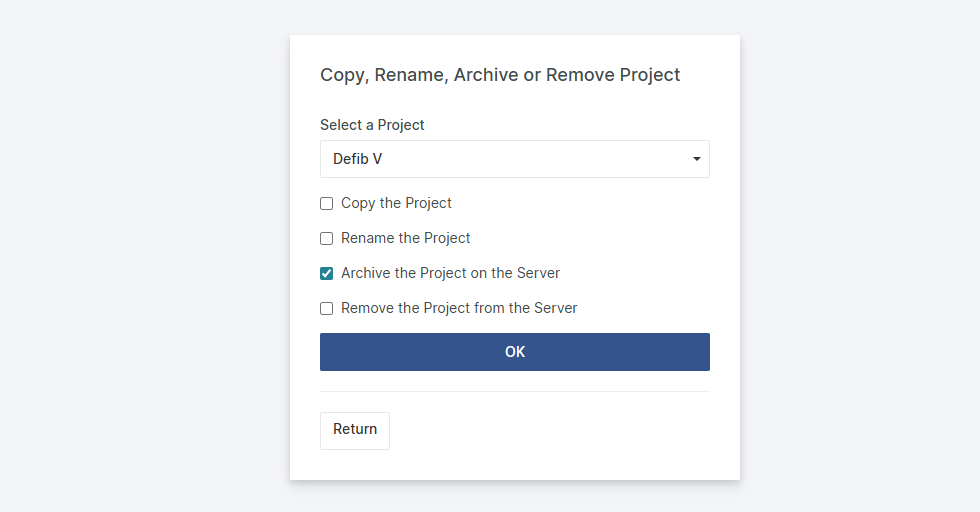
  1. Select a project
  2. Click the archive action
  3. The project is marked as archived
  4. The project remains visible with an “Archived” indication

That’s it.

No exporting. No manual file management. No complicated IT involvement.

The project continues to exist within the system and remains fully retrievable whenever required.

Archived Does Not Mean Inaccessible

In regulated industries such as medical devices, historical documentation remains critically important.

Organizations must maintain access to prior Design History Files, legacy documentation, and archived development records for audits, inspections, post market activities, and product lifecycle management.

For this reason, Project Archiving was designed to preserve accessibility at all times.

Archived projects remain listed within the application and can be reopened whenever needed.

If a user selects an archived project, the system automatically restores access and loads the project seamlessly. There is no manual recovery process and no need to contact an administrator and users benefit from a cleaner active environment without sacrificing access to critical historical information.

Scale with Aligned Elements - Supporting Growing Organizations

As medical device organizations expand, scalability becomes increasingly important. Processes that work well with a small number of projects can become difficult to manage across hundreds of active and historical projects.

Project Archiving introduces a practical lifecycle management approach by separating active and inactive work while preserving full historical access. This is particularly beneficial for enterprise environments, long product lifecycles, and organizations managing extensive legacy portfolios.

Looking Ahead

Designed to be effortless for end users and improve overall system responsiveness by reducing the active workload at certain points, Project Archiving is another step toward helping medical device organizations manage growing Design Control environments more effectively.

The feature delivers a simpler, cleaner, and more scalable user experience while keeping historical projects fully accessible whenever needed.

About the Author
[rocket]

Accelerate your journey to CE Mark and FDA approval

Try aligned elements 30 days for free!

Start Today

Continue reading

Aligned Elements V3.2 (3.2.593/287.25450) is here, and we are proud to includes a large set of new features and fixes.

What's New

V3.2 comes with the introduction of the Aligned eQMS, a complementary product to Aligned Elements.

Get the full story on some of the new features in Aligned Elements V3.2 below:

The Release Notes containing all new features and fixes can be found here.

Sign up to the "What's New" Webinar on Thursday December 11th

Curious to see the new features live?

Want to gain a deeper insight into what Aligned Elements V3.2 can do for you?

Register today to the "What's New" Webinar

When: Thursday, December 11th, 2025

Time: 16:00 CET (45 Min)

Use this link to Sign up

Upgrade Now

This release is a recommended upgrade.
Find the installer to Aligned Elements V3.2 here.

  • Written by

  • on

  • . Posted in

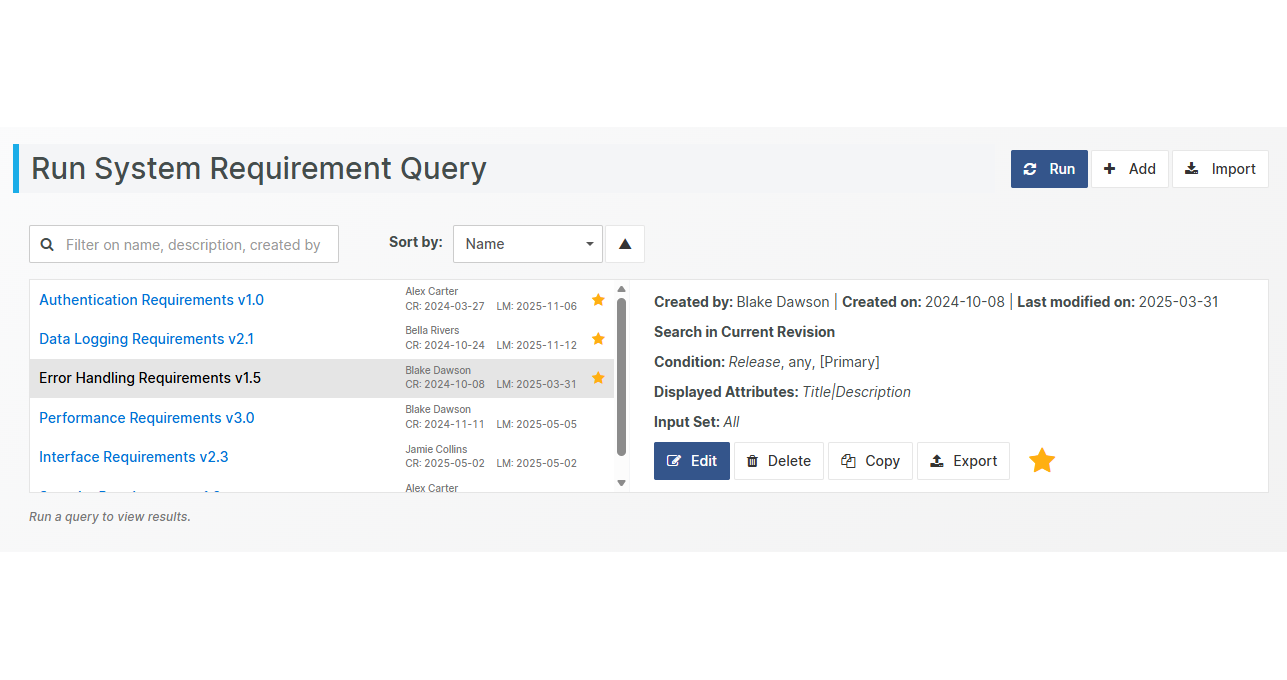
Managing queries just got a major upgrade in Aligned Elements. With our enhanced query view, you can now sort, select, and prioritize your queries with ease. No more scrolling through endless lists. Your most important queries are always front and center.

Mark queries as favourites and watch them rise to the top, giving you instant access to the items that matter most. Whether you’re reviewing requirements, tracking changes, or preparing reports, this feature keeps your workflow smooth, fast, and intuitive.

With favourites taking the lead, you can spend less time searching and more time doing what matters: delivering high-quality results efficiently. Try it out in the latest release and experience the fast lane for your queries!

About the Author
[rocket]

Accelerate your journey to CE Mark and FDA approval

Try aligned elements 30 days for free!

Start Today

Continue reading

  • Written by

  • on

  • . Posted in

We are excited to introduce Catalogue Projects, a new feature in Aligned Elements that makes re-using Design Control items and documents smarter, more efficient, and fully traceable.

Catalogue Projects allow you to build Design Control libraries that serve as centralized collections of reusable, pre-approved items, encapsulated knowledge that can be shared across multiple projects.

This new capability ensures that your team can rapidly re-use proven Design Controls and leverage already established engineering work, standing on the shoulders of previous development work.

From Copying to Controlled Reuse

The already available ways of reusing Design Control data, such as linked projects, branching-merging, copying between projects or import-export has their well-deserved places in the palette of Design Control engineering. However, as Design Control copies solves the problem to some extent, they are innately isolated from their originals. If the source item changes, the copied version stays ignorant of the change event. Synchronizing such changes is a challenge.

Catalogue Projects solve this problem by introducing reference instances of items. When you re-use an item from a Catalogue, your project creates a referenced version that maintains a connection to the original source.
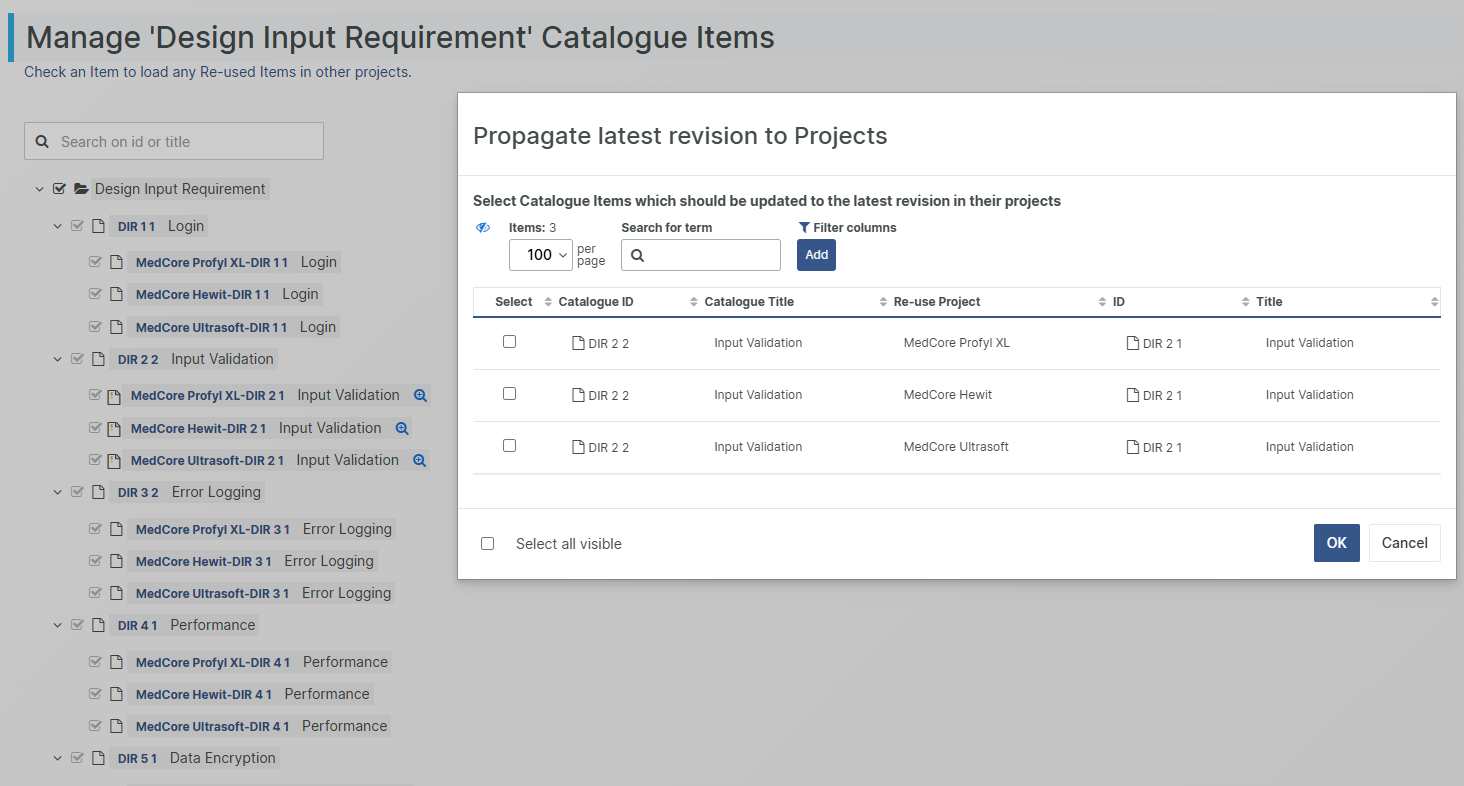
If the source item changes, you can choose to push those updates to the linked items, either individually, selectively, or in bulk. This gives you the best of both worlds: consistency where needed and flexibility where appropriate.

A Central Hub for Reusable Knowledge

A Catalogue Project acts as a dedicated library for Design Control elements, as well as Design Control element chains (Requirements tracing to Specifications training to Tests), and documents (Biocompatibility reports for given materials, Toxicology tests, process validations).

When applying a Catalogue item in a target project, chapter information, attributes, and tags are applied. In the target project, selected attributes in these reused items are read-only, preserving the integrity of your approved data. However, you can still extend the target project items with additional project-specific attributes and notes. This makes it possible to tailor reused content to each project’s needs without altering the common foundation.

Full Oversight and Controlled Updates

From the Catalogue Project, you can monitor exactly where each item is being reused.
When an update occurs in the Catalogue, it requires an explicit User action to push that change downstream. You decide how broadly to apply updates:

  • Cherry-pick specific items to update where it makes sense
  • Perform batch updates to align multiple projects at once

This fine-grained control ensures that your projects stay current with approved content while avoiding unwanted alterations.

If more flexibility is required, you can detach the referenced instance from its source at any time and start making changes independently. 

Why Reusability Matters

As we can see, reusing Design Control items is not just a technical convenience for the individual user. It is a strategic advantage that strengthens your product development process on multiple levels:

1. Faster development and shorter time-to-market

Teams can draw on a growing library of existing, validated content instead of reinventing requirements, risks, and tests for every new project. Proven elements can be reused immediately, helping new projects start faster and reach completion sooner.

2. Consistency and standardization

Reusing standardized Design Control items ensures that core business rules, safety requirements, and regulatory standards are applied uniformly across all projects. This consistency reduces the risk of omissions, discrepancies, or non-compliance.

3. Higher quality and reliability

Each reused item has already been reviewed, approved, and tested in earlier projects. By building on trusted content, you reduce the chance of errors and maintain a higher overall quality baseline.

Building Smarter, Together, with Catalogue Projects

With Catalogue Projects, Aligned Elements evolves from a Design Control management tool into a central knowledge repository for your organization. It helps you establish compliant Design Control information, preserve it and make it available to every future project.

Reusability leads to greater consistency, faster delivery, and less risk of outdated or missing information. Most importantly, it ensures that your teams spend less time rediscovering solutions and more time innovating.

About the Author
[rocket]

Accelerate your journey to CE Mark and FDA approval

Try aligned elements 30 days for free!

Start Today

Continue reading